A conversation with Hy

What are you building?

Construction Tech Platform

One construction platform for five roles who each see the project differently.

Customers, architects and builders each look at a different part of the same house. As the only designer on a 7-person team, I turned the wireframes and specs I received into the final UI and flows, and checked them against the rules of the service, so all five roles work from one project record.

Live since Sept 2025 · Tokyo area

Partial NDA: the client, the product's name and real project details are withheld. The screens are the real designs, in Japanese, with the brand mark and place names replaced. Some screens carry a tag. Rebuilt: the admin shipped from wireframes, so its screens are rebuilt in the product's final UI kit. Recreated: the final file wasn't archived, so the screen is recreated in the same kit. Added: the confirmation dialog on Disagree was added for this case.

How did I help
  • Design & system work
  • PropTech · Web
Role
Sole UX/UI designer
Team
7-person project team: 1 designer, 3 devs, 2 QC, 1 PM
Timeline
13 months
Platform
Web (responsive, shipped as an app)
AI summary
Who's reading? I'll show what matters to you.
  • One construction platform where customers, a director, real estate companies, architects and builders work from one project record.
  • As the only designer on a 7-person team, I turned wireframes and specs into the final UI and checked them against the rules of the service.
  • Live since Sept 2025 in the Tokyo area. Partial NDA: real designs in Japanese, with names replaced.
View CV

The tour: The wireframes had gaps → What kept five roles on one system → Validate with people on site
Ask about this case
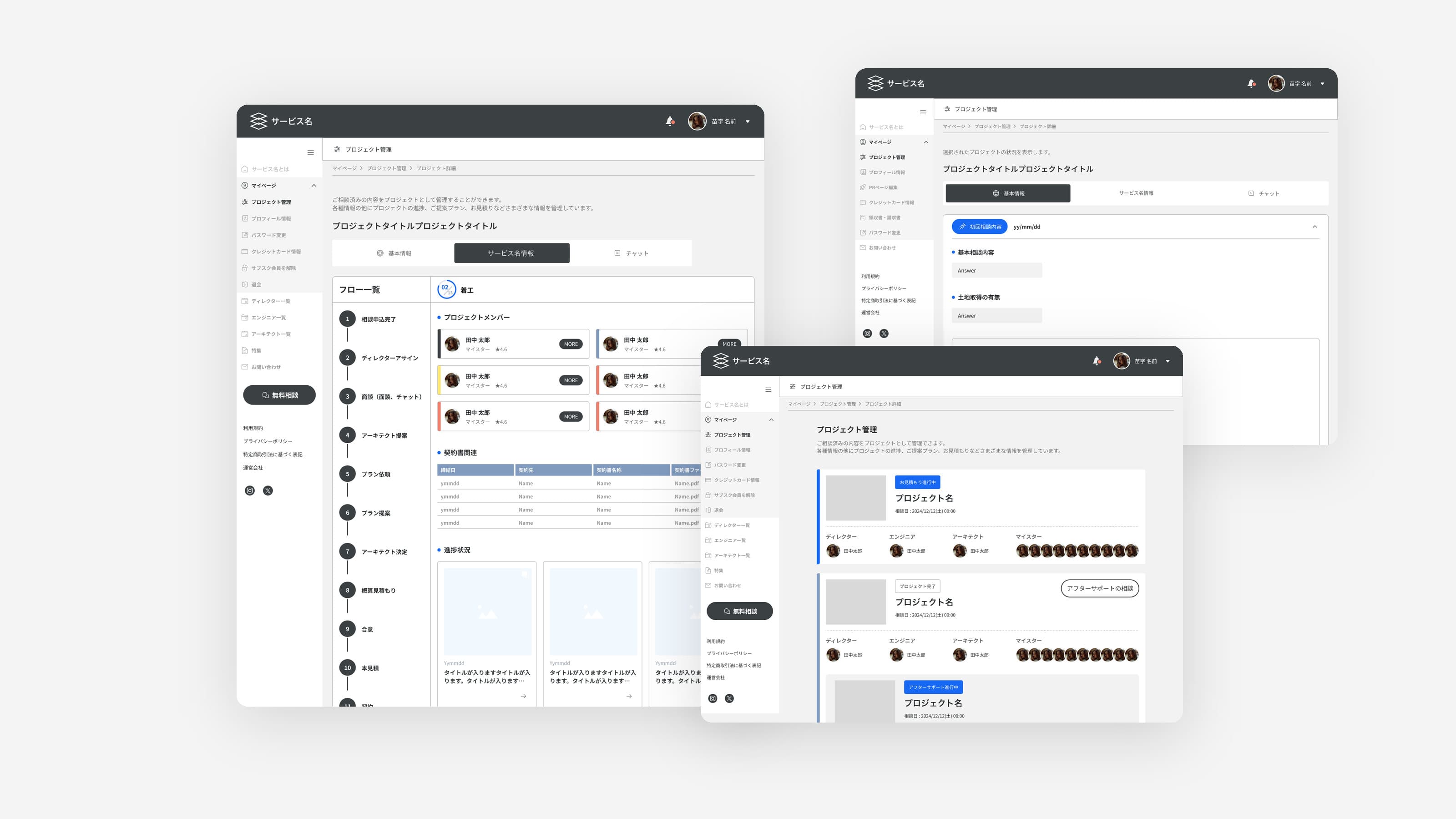
Three real screens of the platform, in Japanese: the customer's project details with the 13-step flow down the left, the customer's project list with each project's director, engineer, architect and builders, and the architect's project details

No layers of middlemen.
One platform, one director.

Five roles, two portals

Custom homes usually pass through layers of middlemen: owners pay more, while architects and craftsmen work to tight deadlines for little. The platform connects them directly, with a director and an engineer in between, and every role sees the same project steps.

Director / Engineerディレクター・エンジニア

Partner portalAll 13 steps

The director runs the project through all 13 steps, from proposing architects to assigning the builders, and completes it once every member is done; the engineer supervises the site.

Large home builders and materials suppliers also work with the company, but outside the platform, so they have no role here.

The director runs all 13 steps.
Everyone else joins when needed.

1プロジェクトアサインProjectassigned2商談(面談、チャット)Talks(meeting,chat)3不動産アサインReal estateintroduced4アーキテクト提案Architectsproposed5アーキテクト選定Architectselection6プラン提案Planproposal7アーキテクト決定Architectdecided8概算見積もりRoughestimate9マイスターアサインBuilderassigned10本見積Finalestimate11契約Contract12着工後Construction13完成CompleteStepDirector's step railDirector / EngineerRuns all 13 stepsCustomerOwn rail of 13 stepsReal estate companyIf the customer asksArchitectProposed at 4, decided at 7Builder (Meister)Assigned at step 9Columns follow the director's rail. Each role sees its own step names; dots mark the steps on its rail, dotted lines the waits.The admin is internal: it vets partners and sets project limits, outside the 13 steps.Director's 13 steps12345678910111213Director / EngineerRuns all 13 stepsCustomerOwn rail of 13 stepsReal estateIf the customer asksArchitectProposed at 4, decided at 7Builder (Meister)Assigned at step 9Dots: steps on each role's rail. Dotted: waiting.Director's 13 stepsDirector / EngineerCustomerReal estateArchitectBuilder1プロジェクトアサインProject assigned2商談(面談、チャット)Talks (meeting, chat)3不動産アサインReal estate introduced4アーキテクト提案Architects proposed5アーキテクト選定Architect selection6プラン提案Plan proposal7アーキテクト決定Architect decided8概算見積もりRough estimate9マイスターアサインBuilder assigned10本見積Final estimate11契約Contract12着工後Construction13完成CompleteDots: steps on each role's rail. Dotted: waiting.Dashed ring: real estate, if the customer asks.Architects: proposed at 4, decided at 7.

The wireframes had gaps.
I closed them.

Approach

I worked from wireframes and specs handed to me. Where a wireframe disagreed with the rules of the service, I redesigned the final UI to follow the rules.

  • 01Check the wireframesRead each wireframe against the written spec and flagged where the two disagreed or stopped short.
  • 02Design the final UITurned the customer and partner wireframes into finished screens, one flow per role, on the component set I extended.
  • 03Map where roles meetChecked the rules where one role's action changes what another can do, like a disagreement that stops every later step.
  • 04Hand off directly to devs and QCAs the only designer, I handed off straight to the 3 devs and 2 QC, so questions came straight to me.

One login,
four partner views.
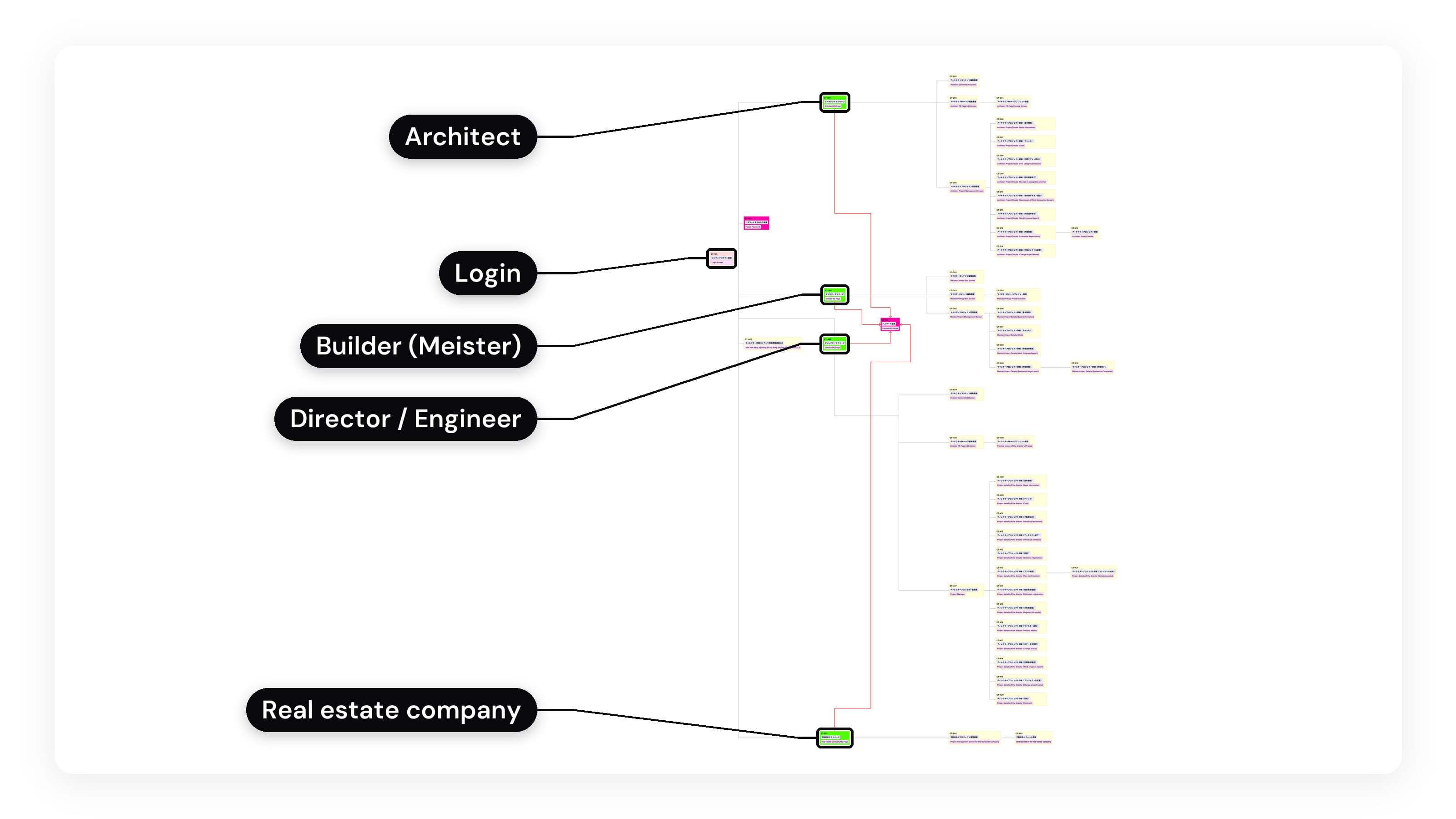
The partner portal sitemap, from the Japanese team: from the login screen, four branches for the architect, the builder (Meister), the director and engineer, and the real estate company, each with its own screens. The animation then zooms into the builder's branch: content and PR page editing, and project management with the project details tabs for basic information, chat, work progress report and evaluation.
Sitemap from the Japanese team

When one role's action changes what another can do.

Edge cases

Four rules from the spec. Two live in the internal admin.
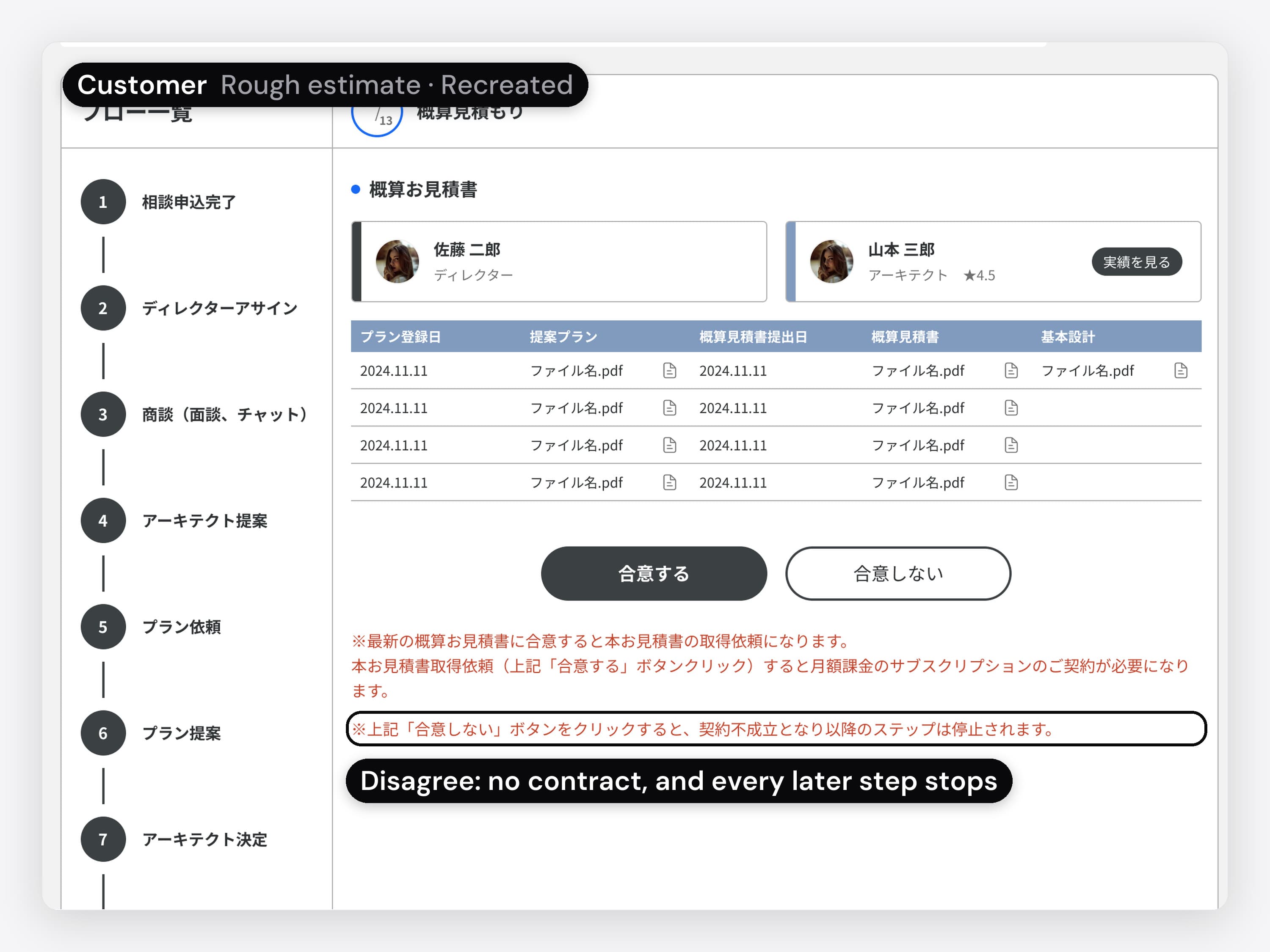
The customer's rough estimate, in Japanese, recreated for this case in the final UI kit, with Agree and Disagree buttons and the spec note in red, with the callout: disagree means no contract, and every later step stops. The animation taps Disagree and a confirmation dialog, added for this case, asks the customer to confirm, saying the contract won't go ahead and later steps stop.
01 / 04 · Customer portal · Recreated

When the customer disagrees

Disagreeing with the rough estimate means no contract, and every later step stops, so the customer confirms it first.

  • The customer's rough estimate, in Japanese, recreated for this case in the final UI kit, with Agree and Disagree buttons and the spec note in red, with the callout: disagree means no contract, and every later step stops. The animation taps Disagree and a confirmation dialog, added for this case, asks the customer to confirm, saying the contract won't go ahead and later steps stop.
    01 / 04 · Customer portal · Recreated

    When the customer disagrees. Disagreeing with the rough estimate means no contract, and every later step stops, so the customer confirms it first.

    The spec: the red note on the screen is its own.
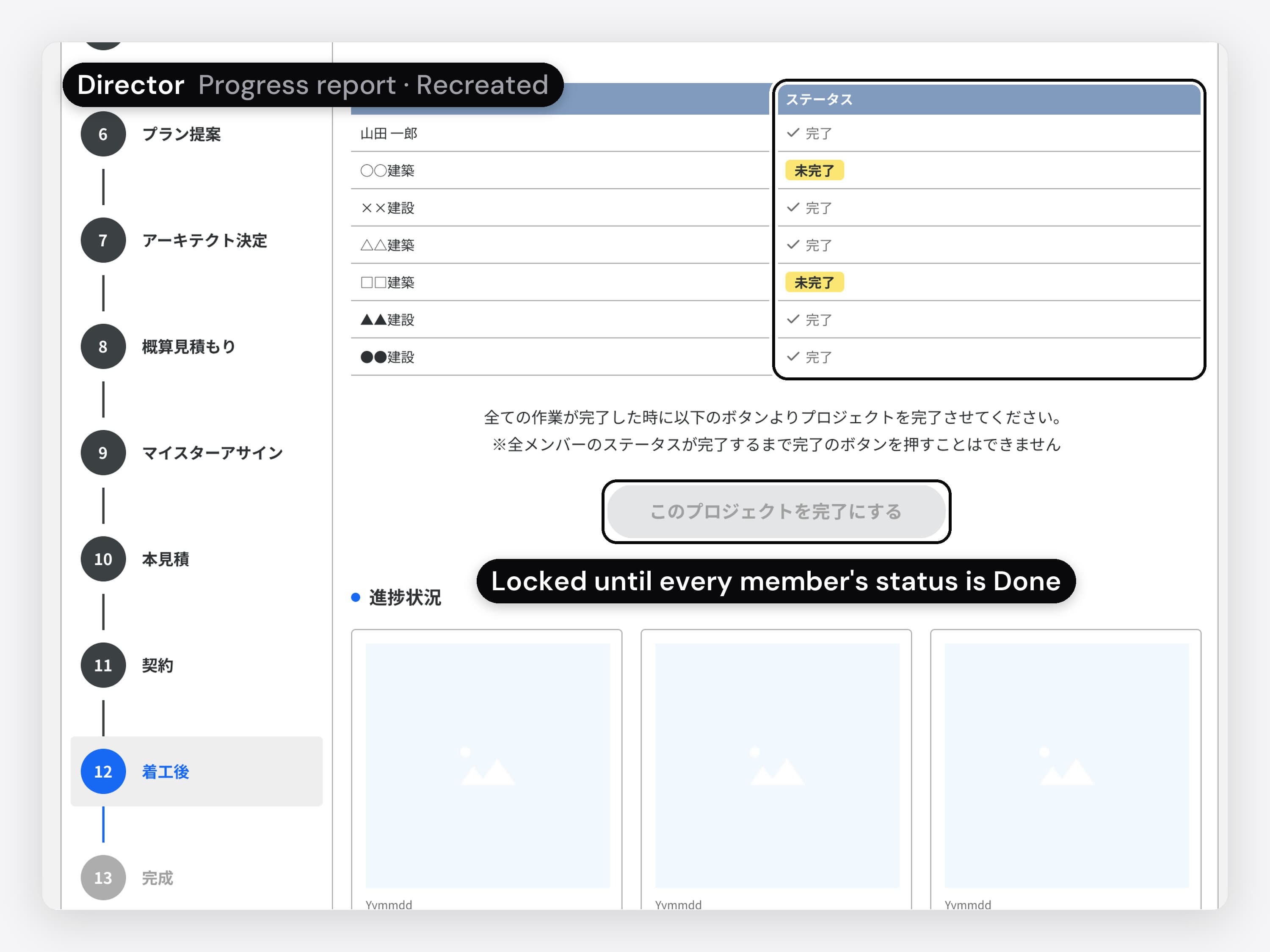
  • The director's progress report, in Japanese, recreated for this case in the final UI kit: the members and their status, two of them tagged not done yet, and the Complete button greyed out, a state added for this case, with the callout: locked until every member's status is Done
    02 / 04 · Partner portal · Director · Recreated

    Finishing a project. The director's Complete button stays disabled until every member's status is Done.

    The spec: the note above the button is its own.
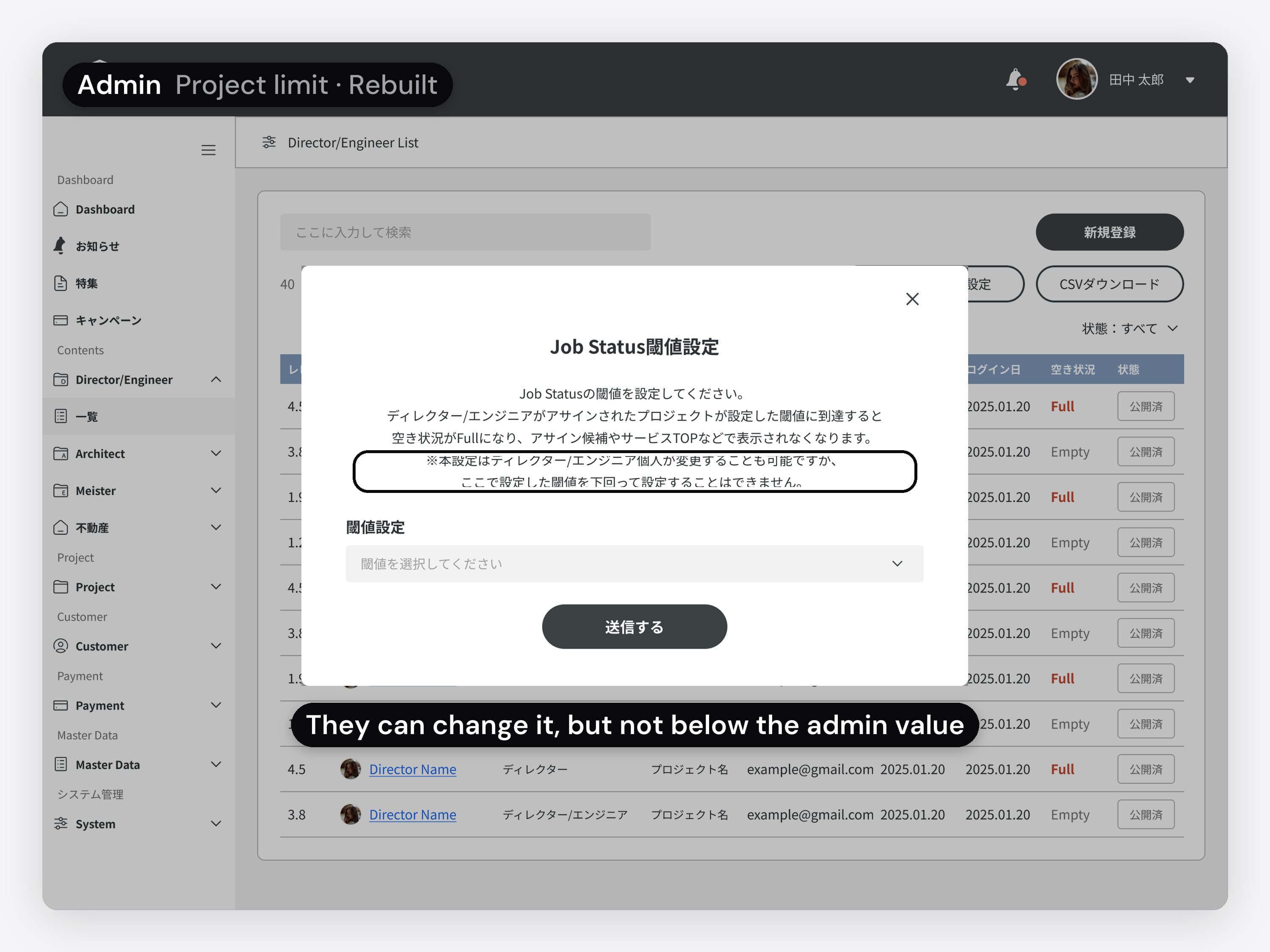
  • The admin's list of directors and engineers, in Japanese, rebuilt for this case in the final UI kit, with a director at the limit shown as Full. The animation opens the project limit dialog, with the callout: they can change it, but not below the admin value; sending it empty shows an error.
    03 / 04 · Admin portal · Rebuilt

    When a director reaches their limit. The admin sets how many projects a director can take at once. At the limit, the director shows as Full. Directors can change their own limit, but not below the admin's value.

    The spec. The admin was built last, straight from its wireframes.
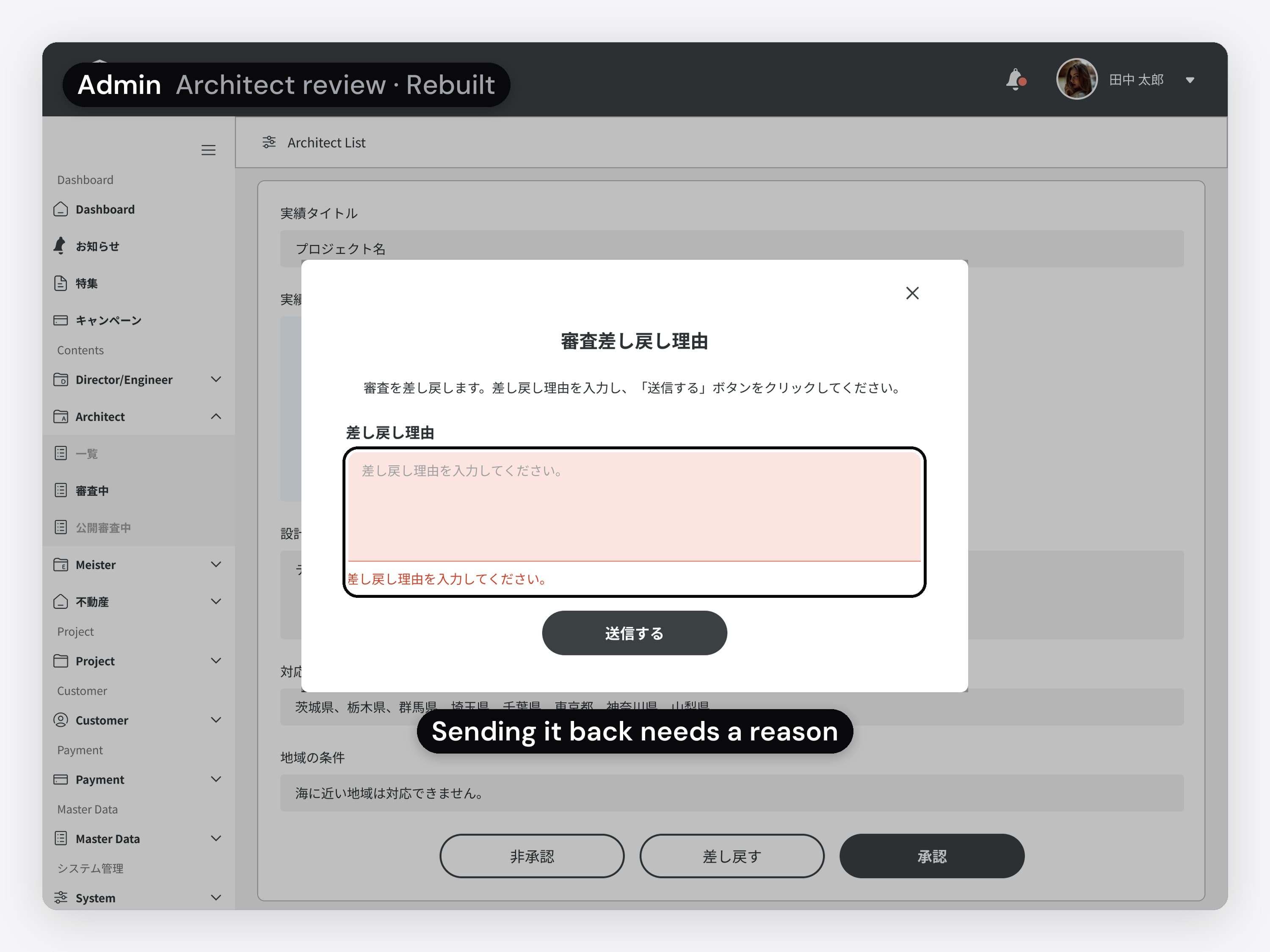
  • The admin's architect review, in Japanese, rebuilt for this case in the final UI kit. The animation opens the send-back dialog and sends it with the reason field empty: the field shows an error, with the callout: sending it back needs a reason
    04 / 04 · Admin portal · Rebuilt

    Sending an application back. The admin reviews each architect's application. Sending it back needs a reason: the dialog won't go through with the field empty.

    The spec. The admin was built last, straight from its wireframes.

What kept five roles on one system.
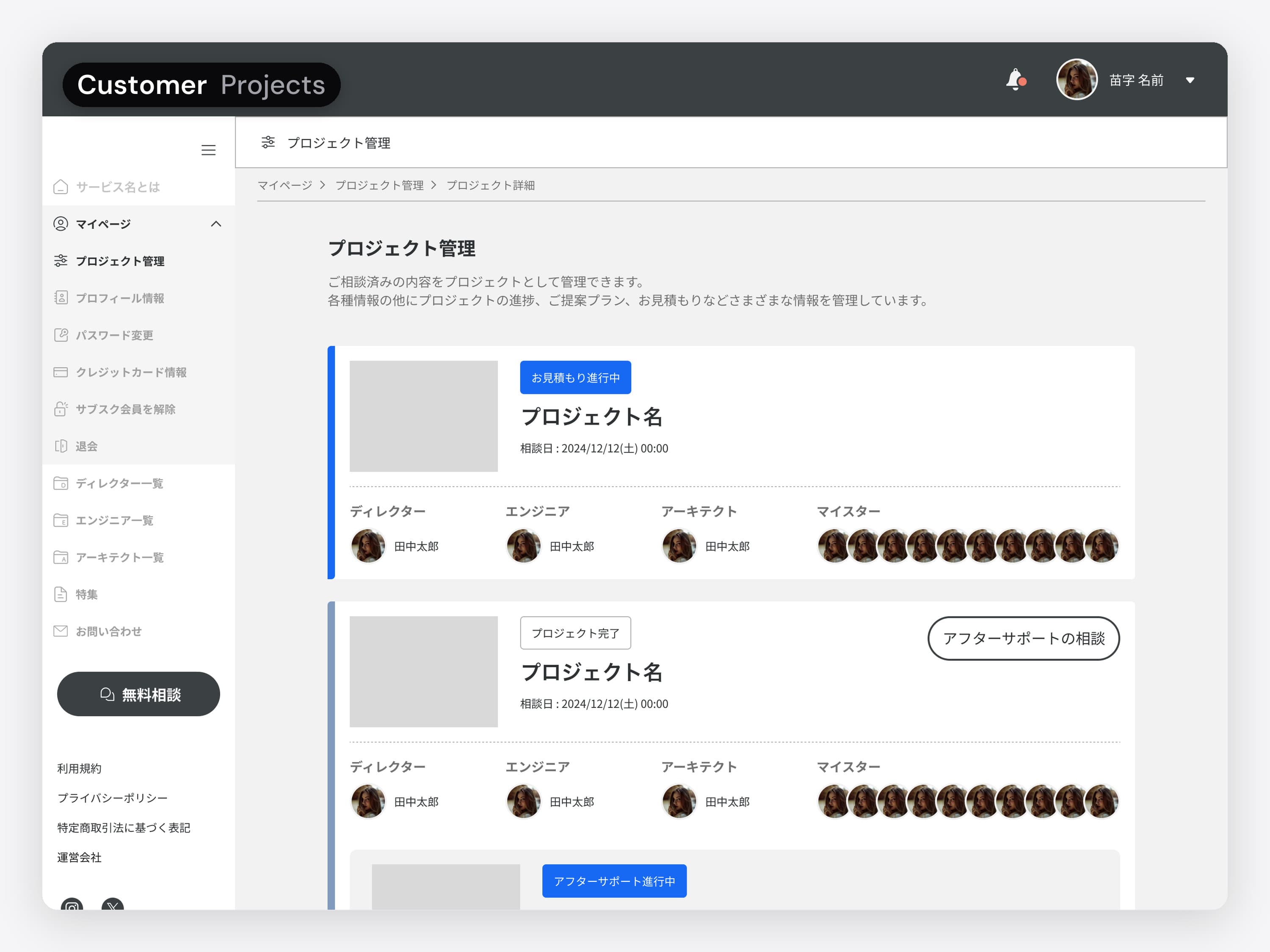
The customer's project list, in Japanese: each project with its photo, title, dates and its director, engineer, architect and builders. The animation then shows the architect's project details.
01 / 05 · Role-based dashboards

A starting screen for each role

Each role needs a different starting point in the same projects.

  • The customer's project list, in Japanese: each project with its photo, title, dates and its director, engineer, architect and builders. The animation then shows the architect's project details.
    01 / 05 · Role-based dashboards

    A starting screen for each role.

    Each role needs a different starting point in the same projects.
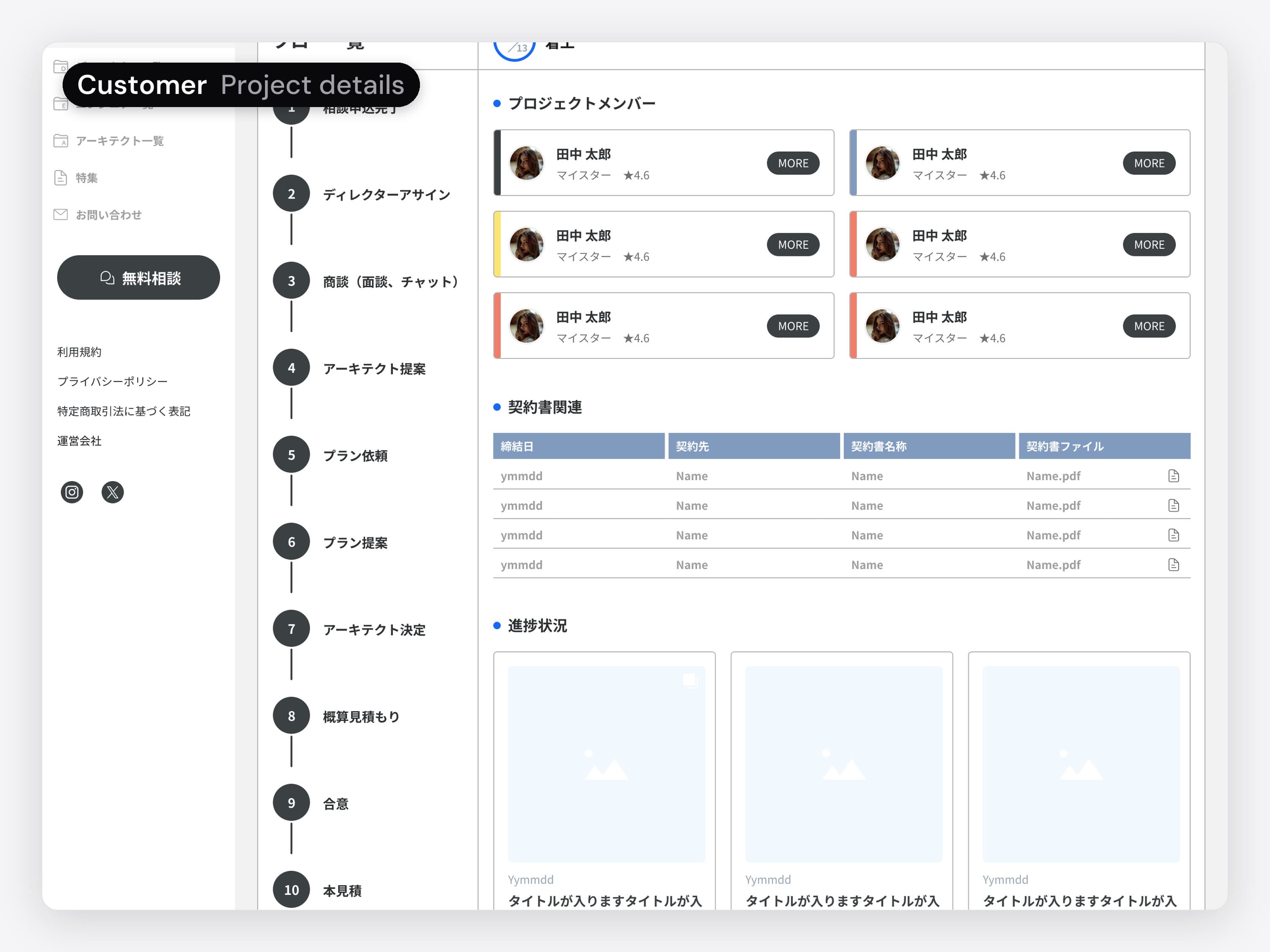
  • The customer's project details, in Japanese: the project flow down the left with the current step marked, the project members, the contract files and the progress posts
    02 / 05 · Shared project data

    One project page for everyone.

    Each role works on a different part of the same project.
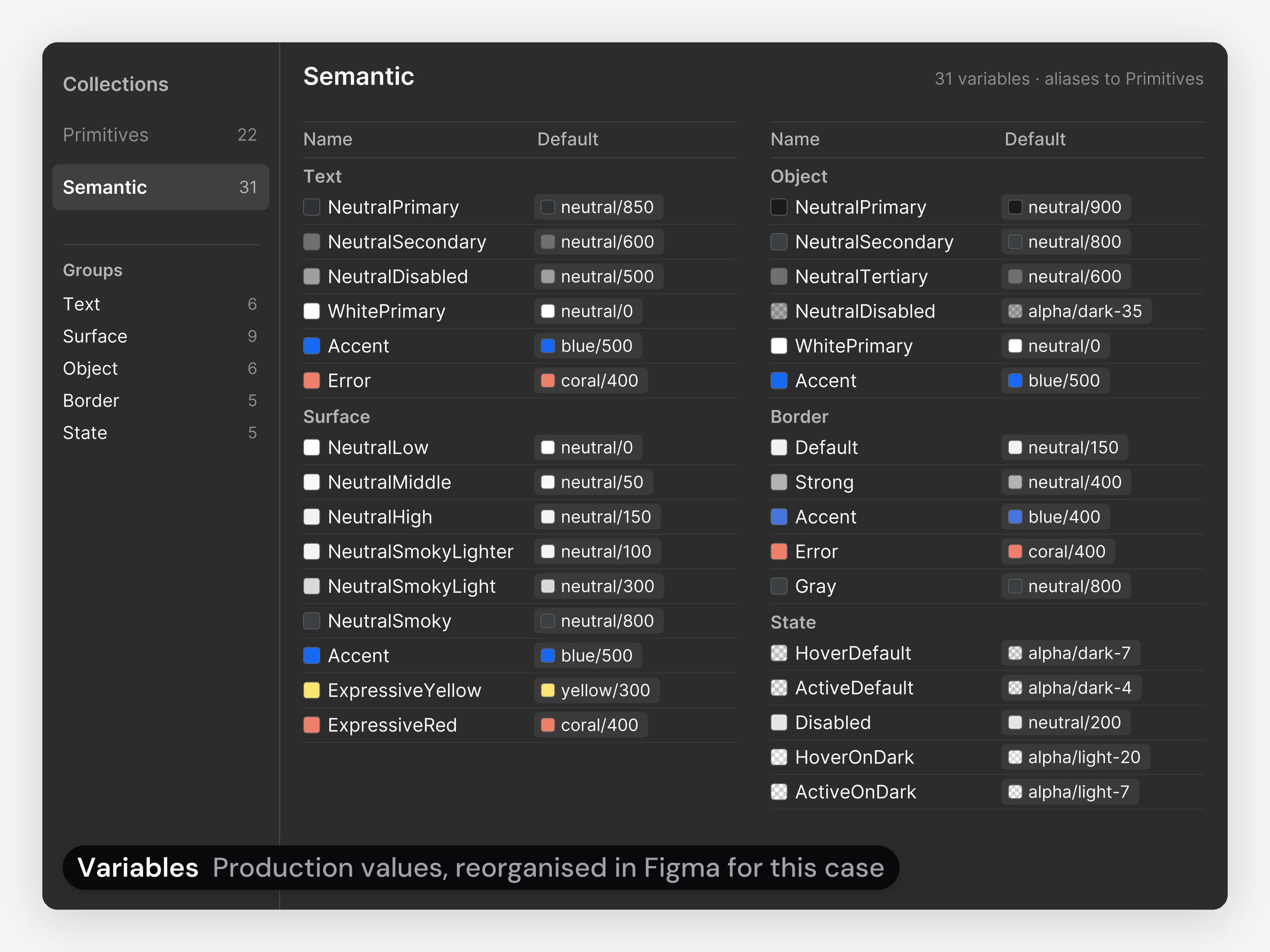
  • The product's colour variables in a Figma Variables panel, reorganised in Figma for this case: a Primitives collection of raw colours and a Semantic collection of 31 tokens in Text, Surface, Object, Border and State, each pointing at a primitive, such as Text NeutralPrimary at neutral 850 and Surface Accent at blue 500. The animation first shows a project details wireframe, white with no header colour, then the final project details screen with the dark header, then the shared component sheet: header, side menus, icons, tags, step markers, buttons in every state, dropdowns and a form field with an error.
    03 / 05 · Component system

    A reusable UI system.

    Five roles meant the same parts drawn many times.
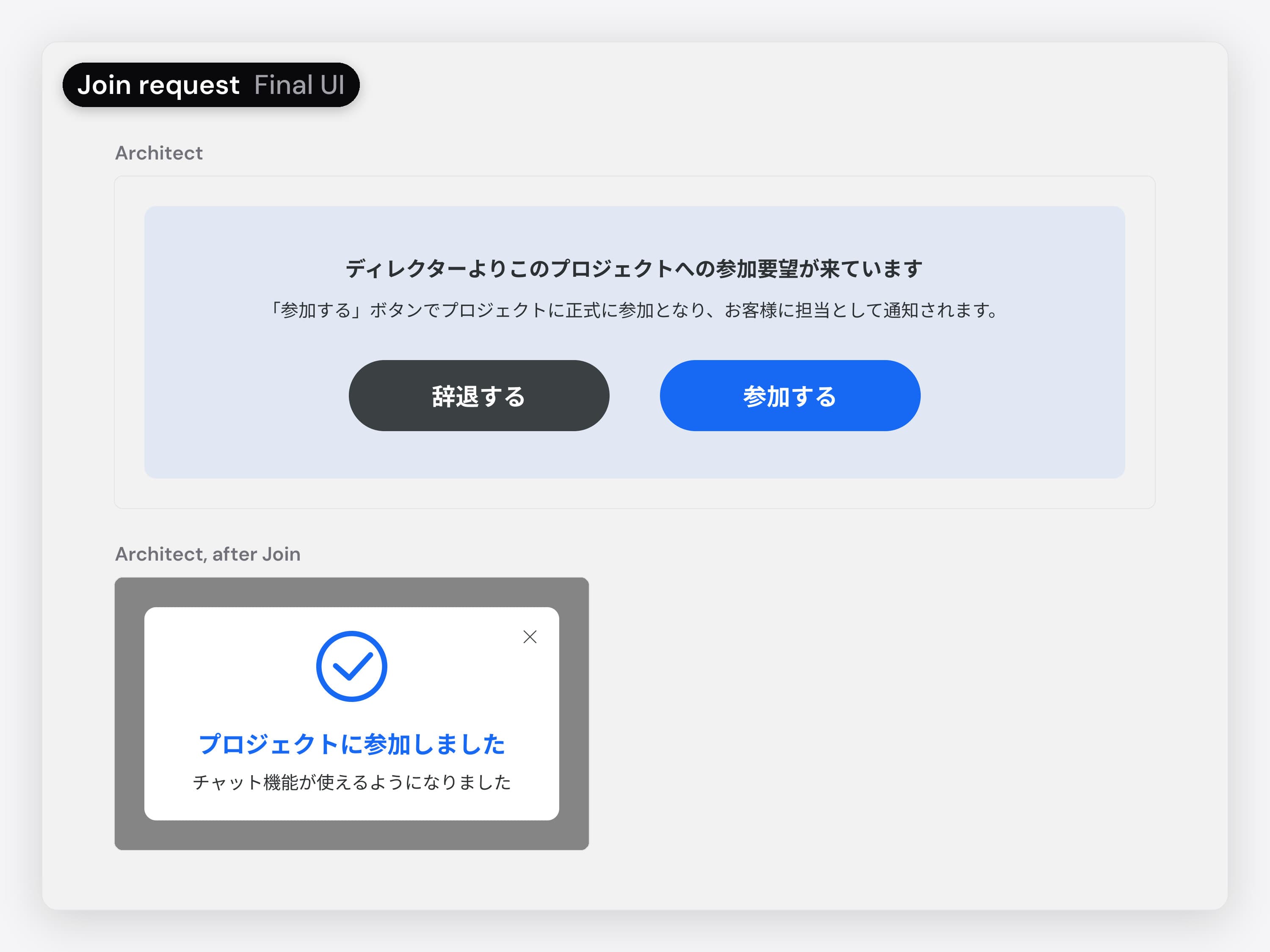
  • A join request before and after, in Japanese. First the wireframes from the Japanese team: for a real estate company, a request from the operator (運営より) with Accept and a grey Decline; for the director, the same request with Accept only and a line asking them to contact the operator to decline. Then the final UI for an architect: the request comes from the director (ディレクターより), with 辞退する (Decline) and 参加する (Join) side by side, and after Join a dialog says プロジェクトに参加しました (You joined the project) and チャット機能が使えるようになりました (Chat is now available).
    04 / 05 · Partner portal

    A join request partners can answer.

    I named the director as the sender, put Decline next to Join, and designed the dialog after joining that says chat is now open.
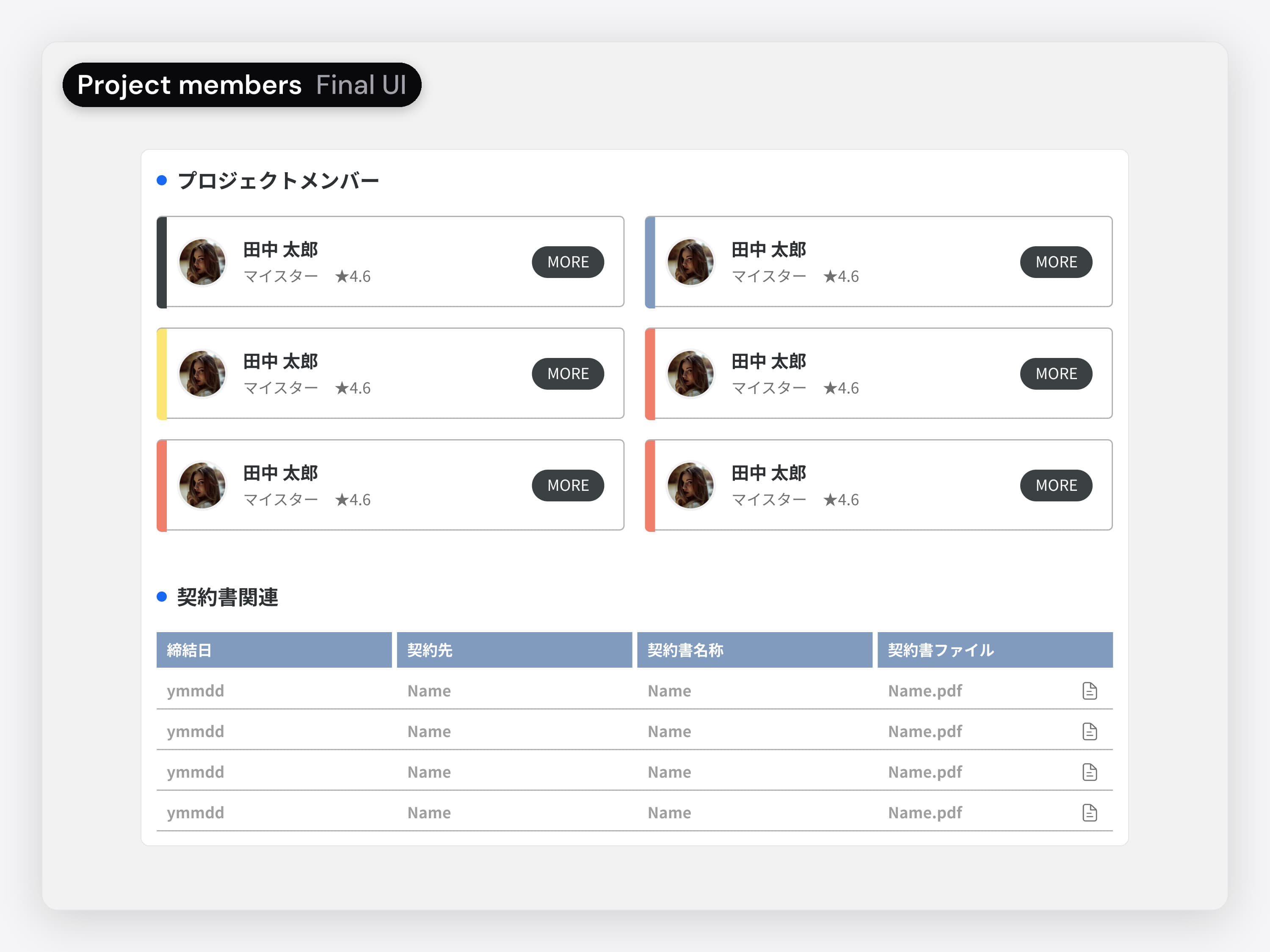
  • Project members before and after, in Japanese. First the wireframe from the Japanese team: under 契約 (Contract), the director, one architect card and one builder card, while the contracts table below lists the architect's contract and three builders' contracts. Then the final UI: プロジェクトメンバー (Project members), a grid of six member cards, each with a coloured bar on its left edge, above the same contracts table.
    05 / 05 · Customer portal

    Room for every builder.

    I changed it to a member grid that holds every builder, because from step 9 a project can have several.

The builder posts it.
The director and the customer see it.

One update, three roles

When a partner posts an update, the customer sees it in their portal right away.
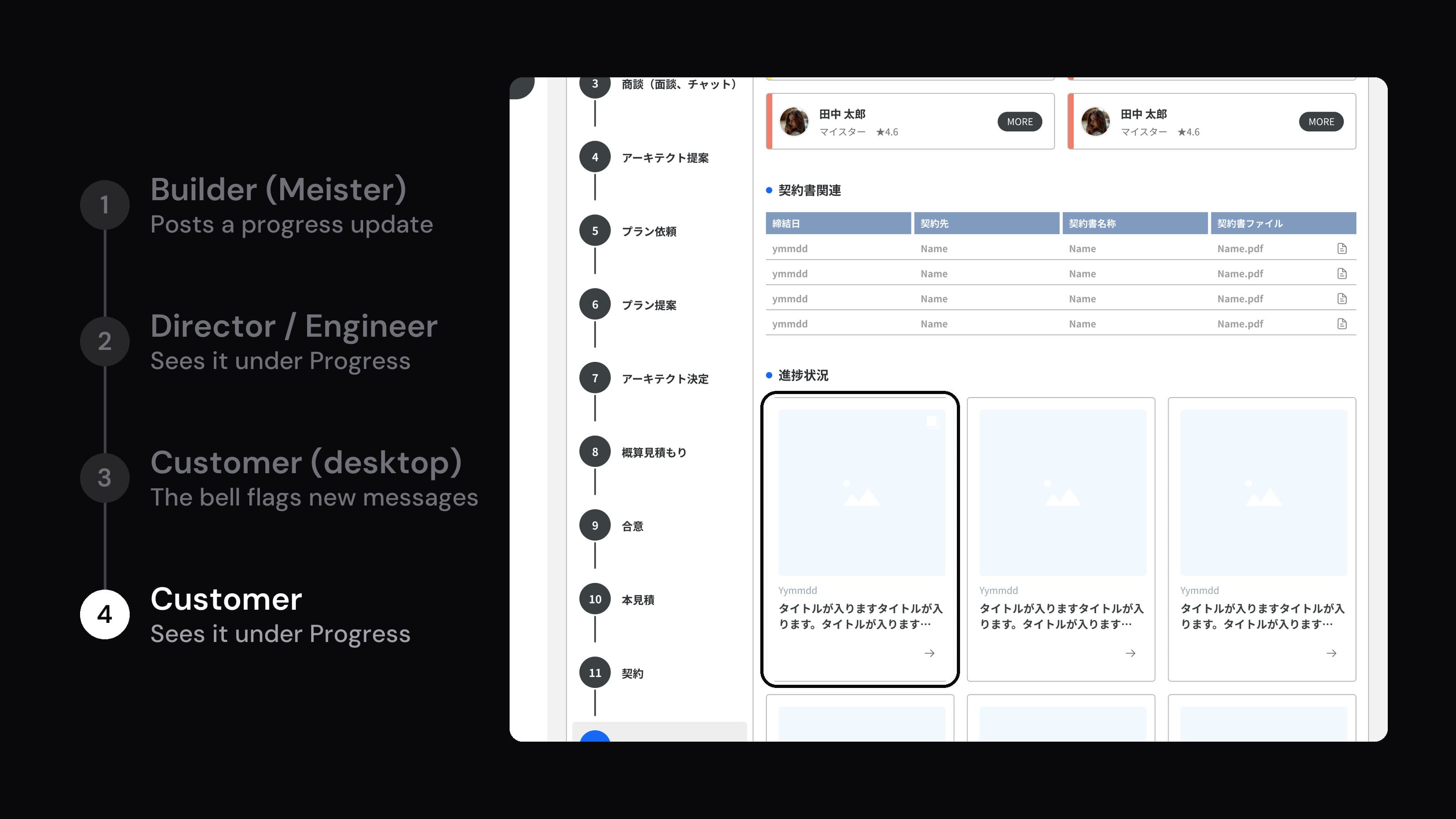
Animated: the builder's (Meister) progress update form, with a title, text and a photo; the director and engineer then see the post under Progress in their portal. On desktop, the customer's My page shows the bell in the header and the message list, then the customer sees the post under Progress. Real screens in Japanese; the builder's and director's are recreated for this case in the final UI kit.

The same portal on a phone.

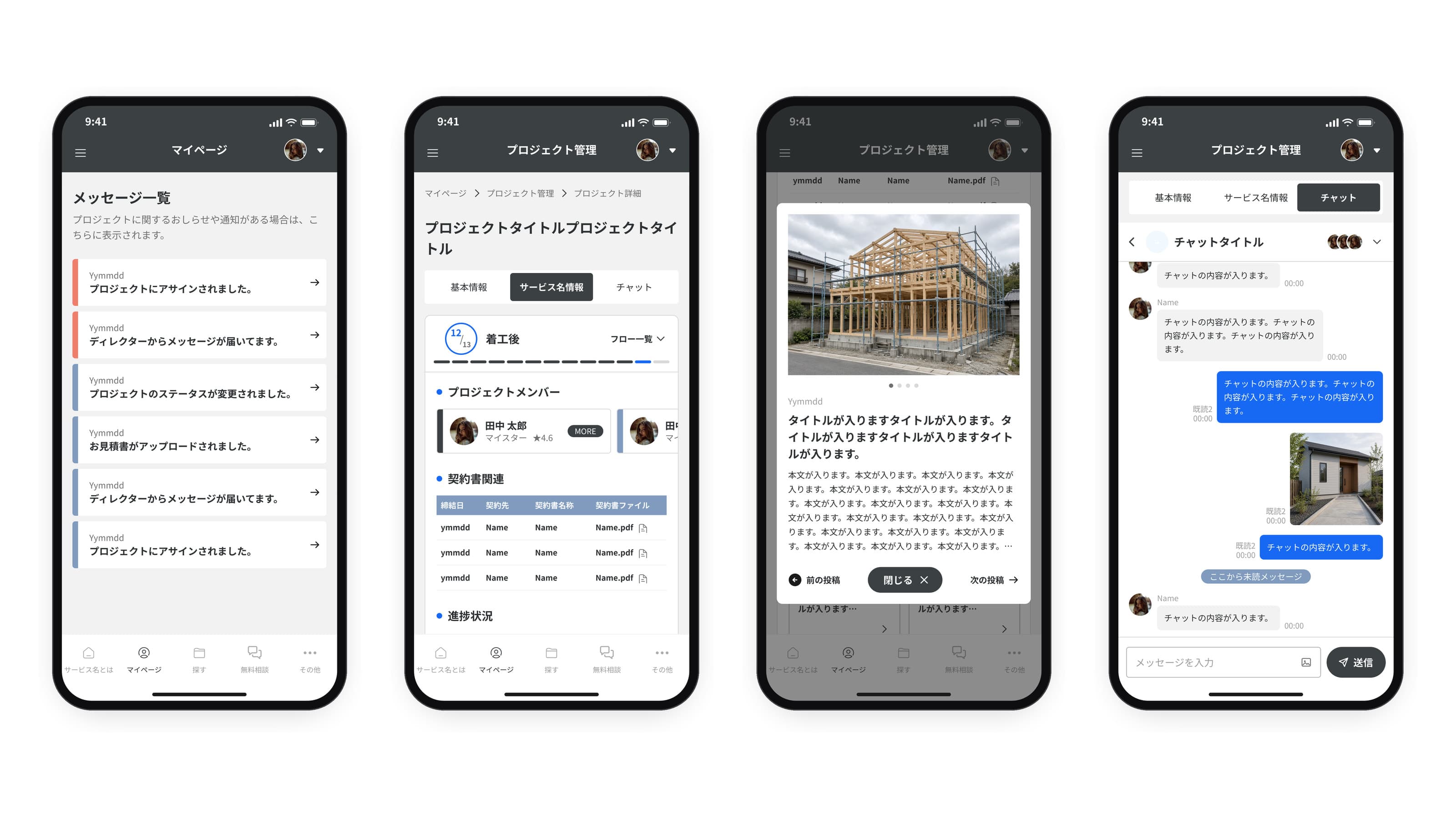
Four phone screens of the customer portal's mobile app, in Japanese: My page with the project notices; the project details with the step badge 12/13 着工後 (after construction starts), the 13-step bar, the members, the contract files and the progress posts; a progress post open in a dialog with its photo, date, title and text; and the project chat with read receipts and a photo message.

Inside the product.

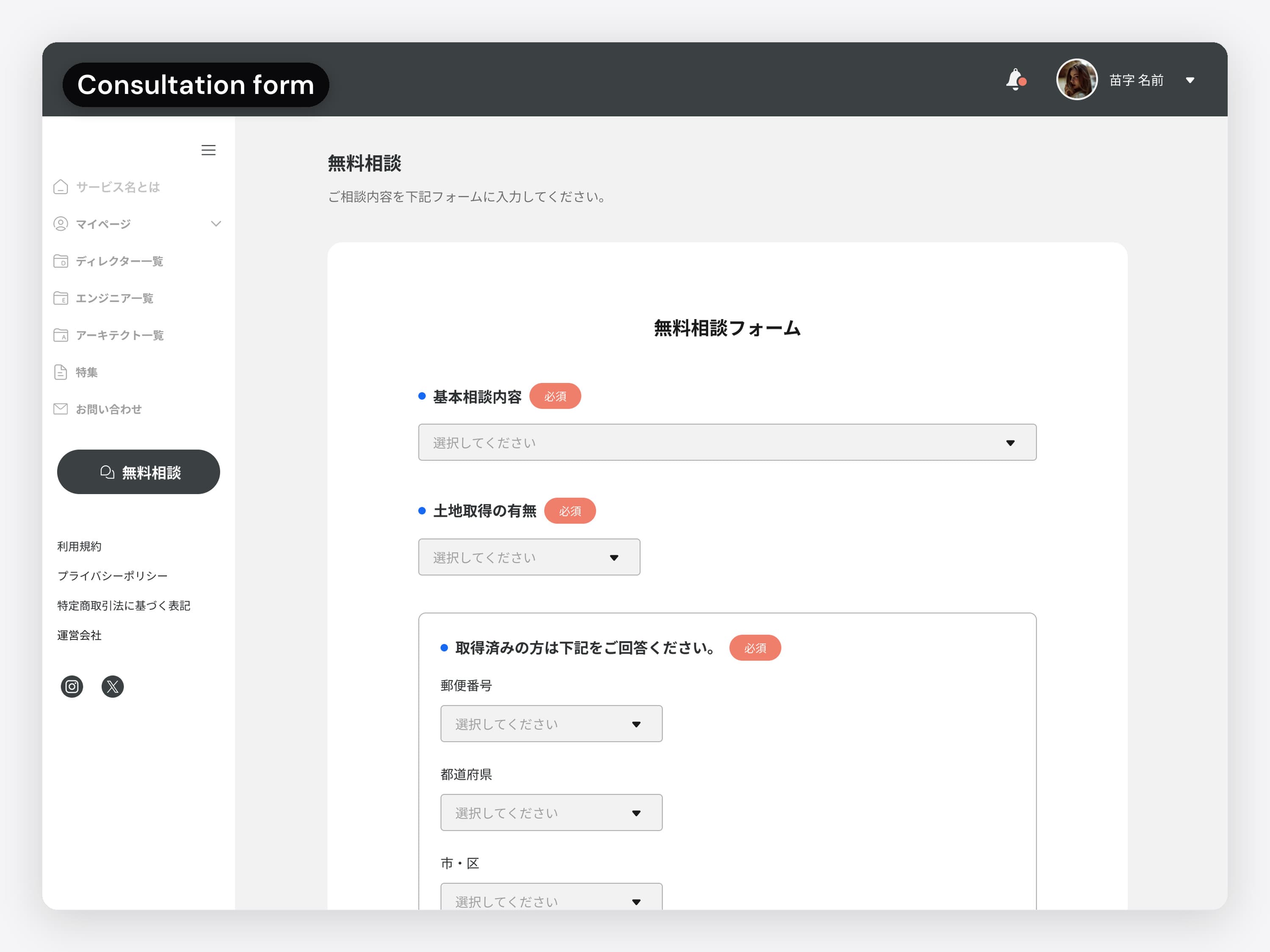
The customer's free consultation form, in Japanese. The animation runs from the top page to the form and down to its send button, then to the messages on My page.
01 / 06 · Customer portal

Ask for a free consultation

The customer sends the free consultation form; updates then come in as messages on their My page.

  • The customer's free consultation form, in Japanese. The animation runs from the top page to the form and down to its send button, then to the messages on My page.
    01 / 06 · Customer portal

    Ask for a free consultation. The customer sends the free consultation form; updates then come in as messages on their My page.

    The consultation form and the customer's My page.
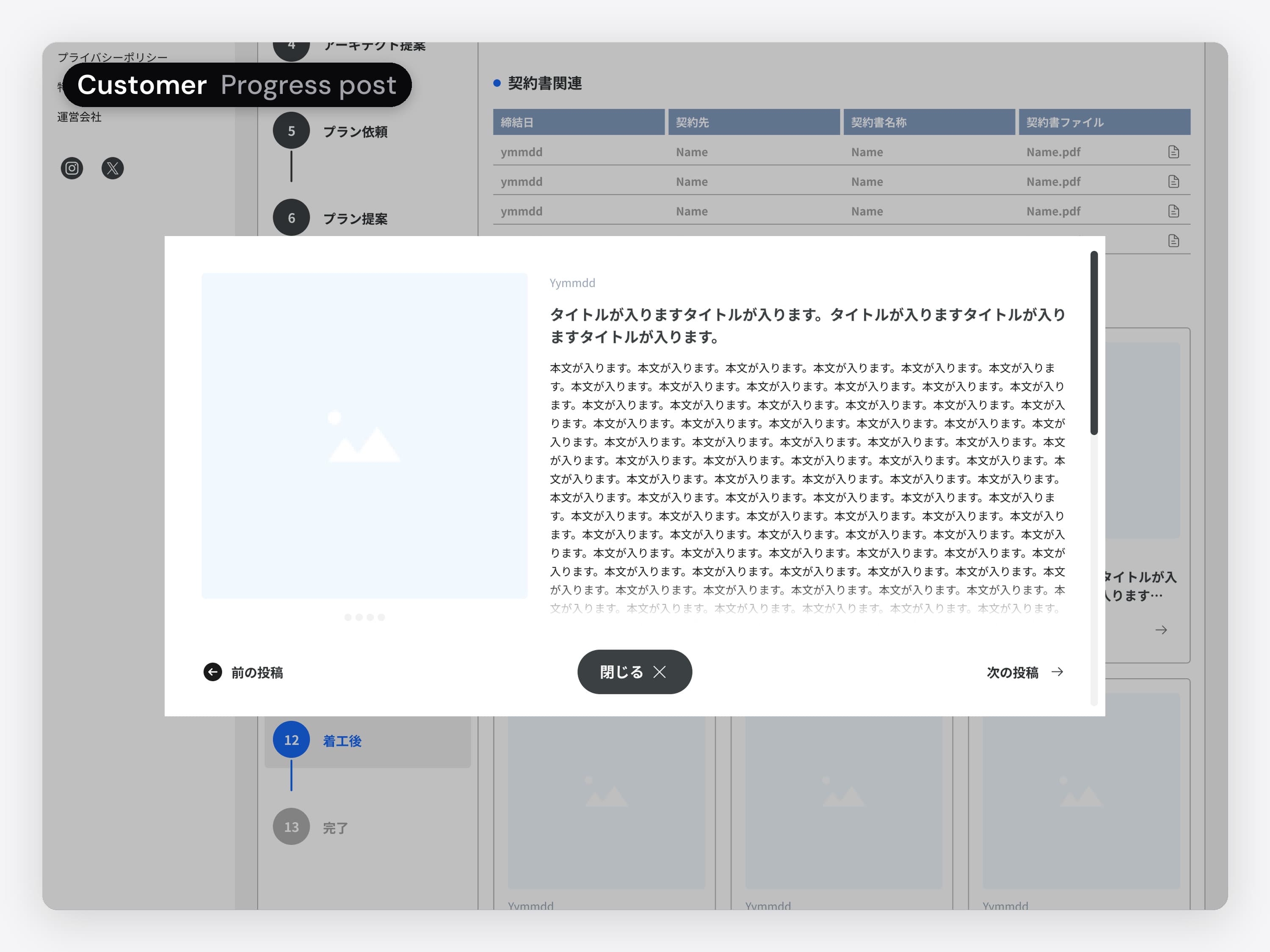
  • The customer's project page, in Japanese, with a progress post open in a dialog: its photo, date, title and text, with links to the previous and next posts. The animation opens the post from the project page.
    02 / 06 · Customer portal

    Follow the build. On the project page, the customer opens a progress post to read it.

    The project page and the dialog that opens each progress post.
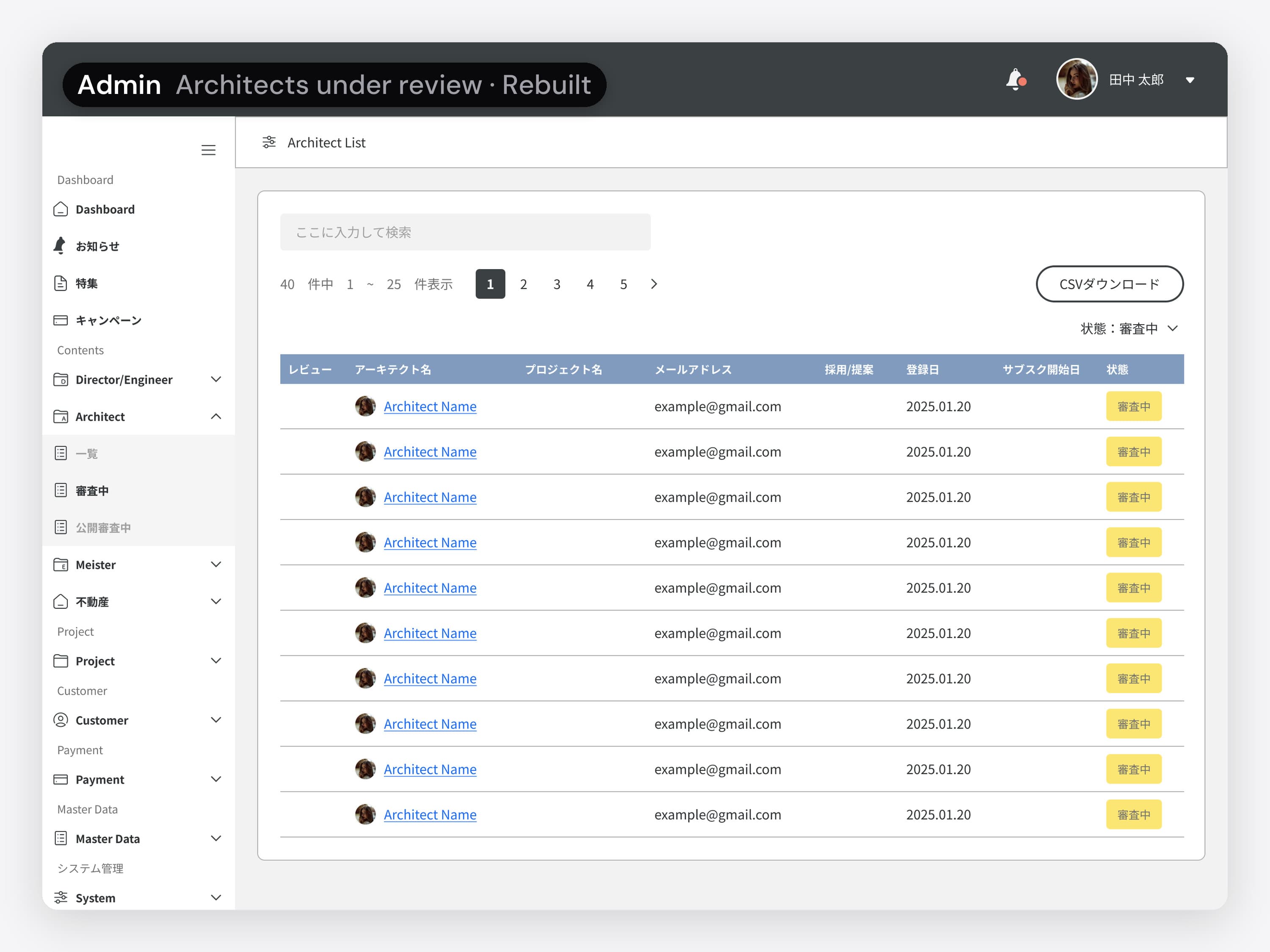
  • The admin's list of architects under review, in Japanese, rebuilt for this case in the final UI kit. The animation opens one application, scrolls to its buttons and approves it in a confirmation dialog.
    03 / 06 · Admin portal · Rebuilt

    Vet a new architect. The admin opens an architect's application, reads it through and approves it after a confirmation.

    The admin isn't my design; these screens are rebuilt in the final UI kit for this case.
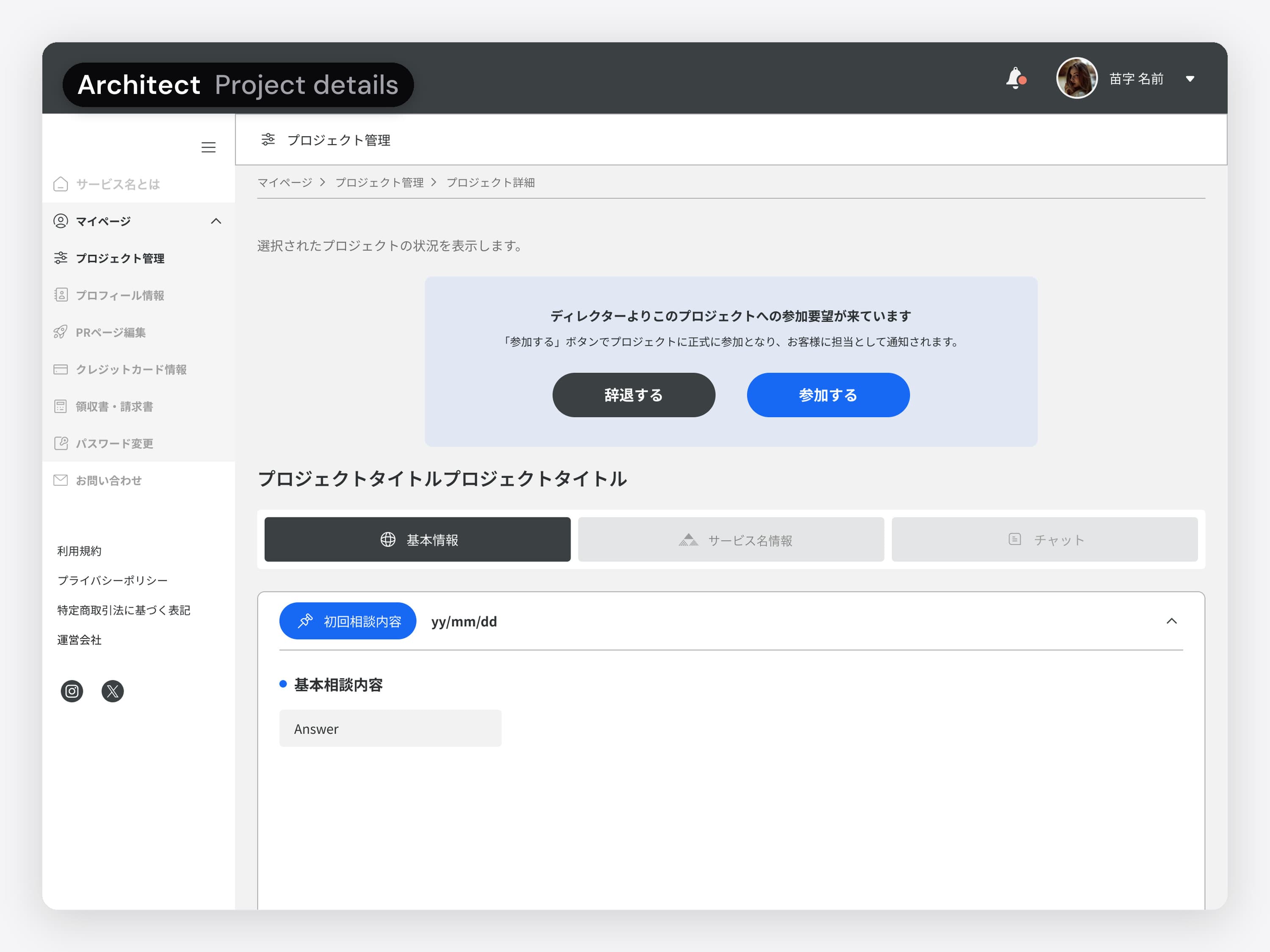
  • The architect's project details, in Japanese, with the director's request to join the project and two buttons, Decline and Join. The animation taps Join, a dialog confirms the architect joined and that chat is now open to them, then the project details show without the request.
    04 / 06 · Partner portal · Architect

    Join a project. At step 4, the director sends the request to join to the architects proposed to the customer. One tap on Join confirms it, and the customer is told who is in charge.

    The request on the architect's project page, and the dialog that confirms they joined.
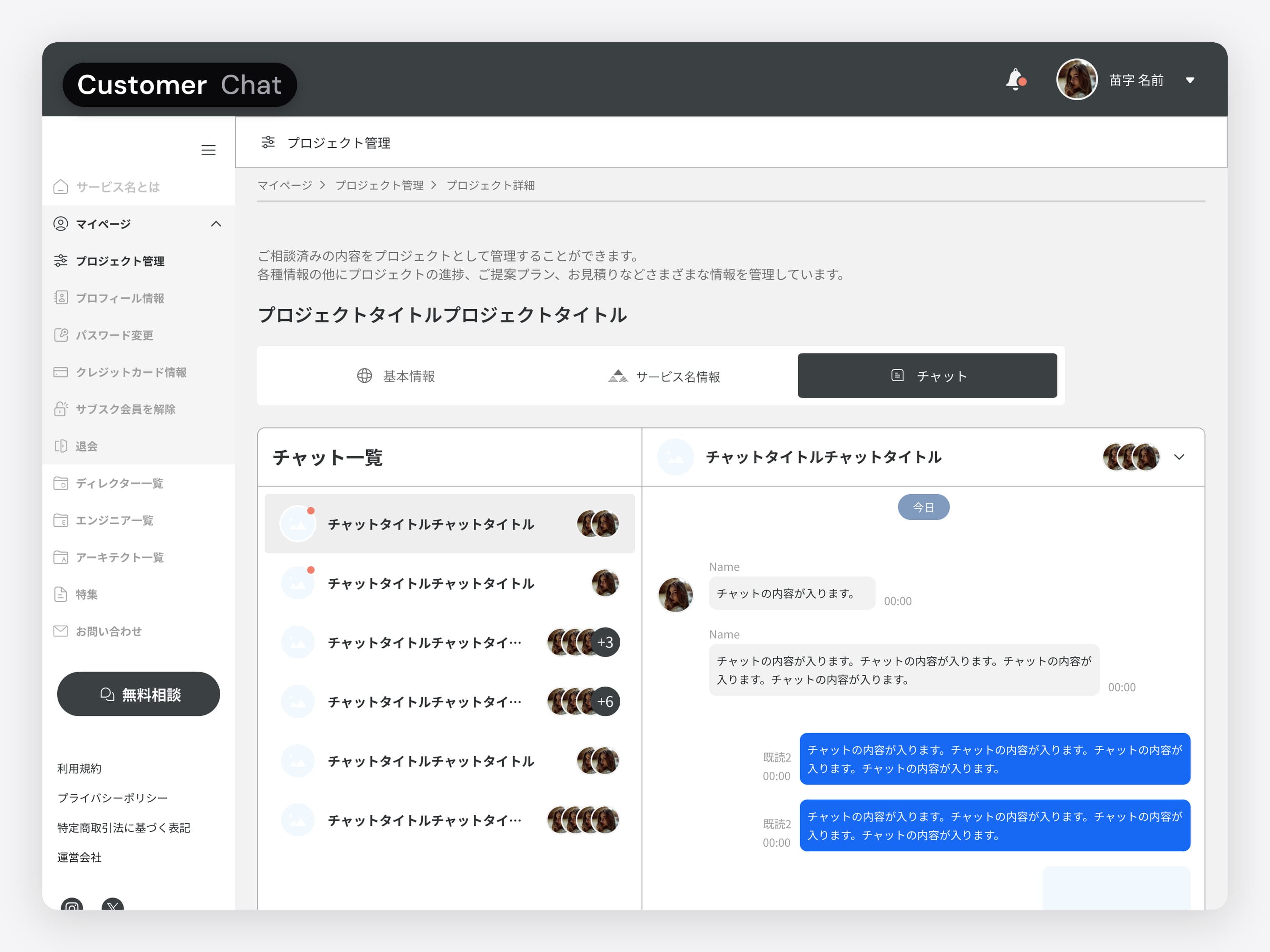
  • The customer's project chat, in Japanese: the list of chats on the left and the open conversation on the right. The animation starts on the project's basic information and switches to the Chat tab.
    05 / 06 · Customer portal

    Talk in the project. Each project has its own chats, one tab away from its details.

    The chat tab: the project's chats on the left, the open conversation on the right.
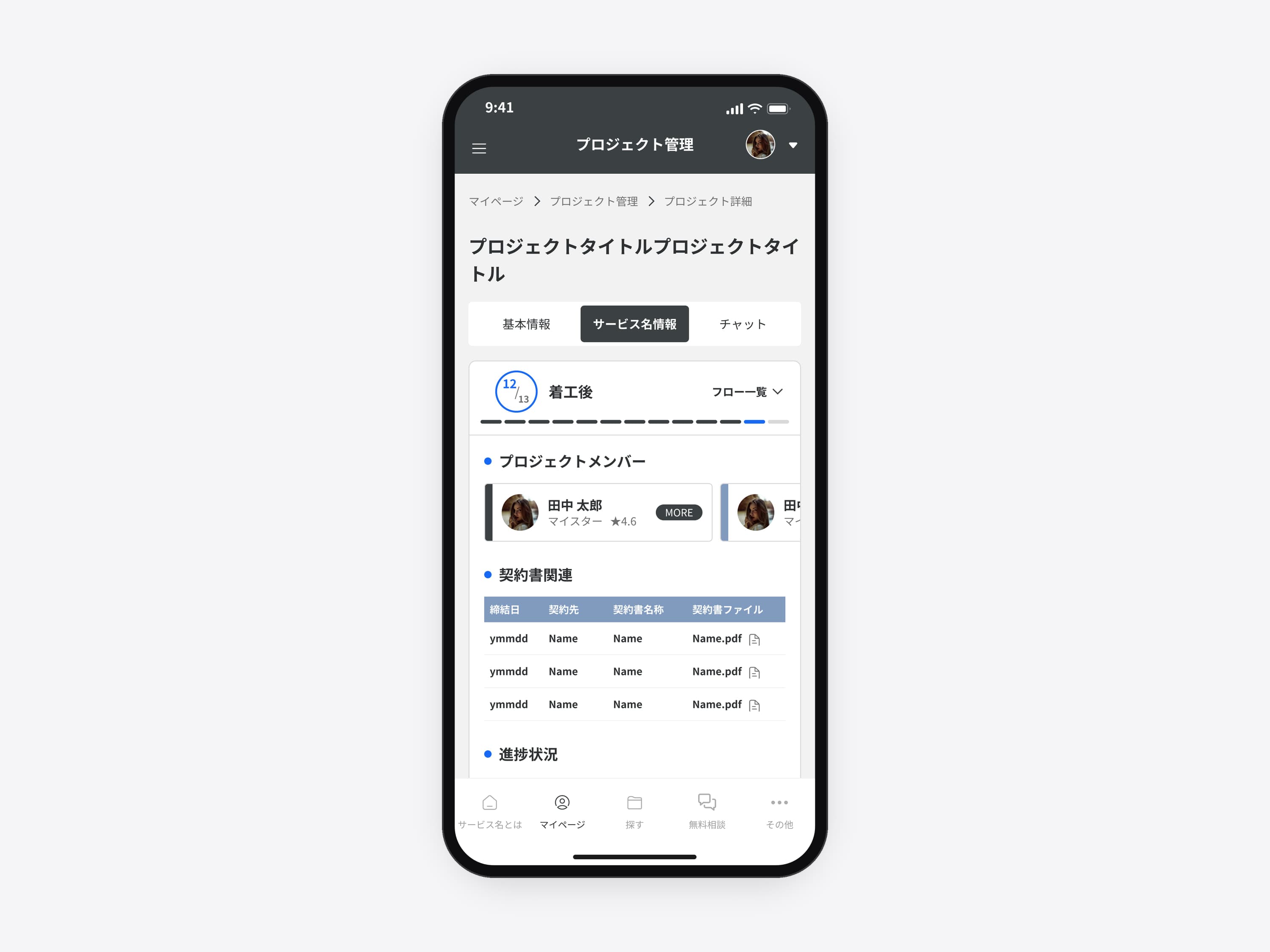
  • The customer portal's mobile app, in Japanese: the project details with the step badge 12/13 着工後 (after construction starts), the 13-step bar, the members and the contract files. The animation starts on My page with the project notices (assigned, message from the director, status changed, estimate uploaded), taps the status notice, opens the project, scrolls to 進捗状況 (Progress) with its photo posts and opens one: photo, date, title and text, with Previous, Close and Next.
    06 / 06 · Customer portal · Mobile app

    Follow a project on the phone. From My page, the customer opens a status notice, scrolls the project down to its progress posts and opens one.

    I designed the responsive web that ships as the app, so the phone UI is the web UI at phone size.

What I'd do differently

Validate with people on site, and measure the change.

The team was my only feedback loop. It caught plenty of logic gaps, but edge cases were checked against what the team believed users did, not what they really did. Next time I'd test with people on site and measure the change after launch.

Lessons
  • Different views, same projectThe hard part was agreeing what is shared and what stays role-specific.
  • Five roles, five starting pointsEach role needed its own entry point into the same data.
  • Fix contrast in the paletteThe error red in the original palette didn't pass contrast. On the screens rebuilt for this case I used a darker red (#C4472F); next time I'd fix it in the palette itself.
Many roles, one product?

Find the gaps before your users do.

For platforms where several roles share the same data and every missing state becomes a support ticket.

Similar work: UX audit, quoted after a short call
More work

All work
Start a conversation

Several user roles and a spec full of holes? Let’s map it out.