A conversation with Hy

What are you building?

Aotomatic

A shrimp farm diary where one day's entry went from 24 screens to 7.

Aotomatic is Forte Biotech's app for shrimp farmers to log each pond, every day. The first version, built by another team, asked one question per screen. The client hired ARIS, the agency I work at, to redo it. As the only UX/UI designer, I grouped the questions into five forms, then designed the add-ons that followed in 2024 and 2026, including an AI chat.

Live on the App Store and Google Play

The screens are the real designs. The first version was built by another team, and its screens are labelled that way. Screens tagged Rebuilt are chat states put together for this case from parts of the real design. Place names, the address and personal details are removed or blurred, and two typos in the web admin are fixed. The demo readings were adjusted to realistic values, and antibiotics in the demo data were replaced with Vitamin C and a probiotic.

How did I help
  • Design & system work
  • AgriTech · Aquaculture
Role
Sole UX/UI designer
Team
2023: 2 mobile, 2 web, 2 QC
Timeline
2023, ~3 months · add-ons in 2024 and 2026
Platform
Mobile app + web admin
AI summary
Who's reading? I'll show what matters to you.
  • Forte Biotech's app for shrimp farmers to log each pond, every day.
  • As the only UX/UI designer on the agency side, I grouped one-question screens into five forms: one day's entry went from 24 screens to 7.
  • I also designed the 2024 and 2026 add-ons, including an AI chat. Live on the App Store and Google Play.
View CV

The tour: Group the questions by the job → An AI chat → Put the five forms in front of farmers earlier
Ask about this case
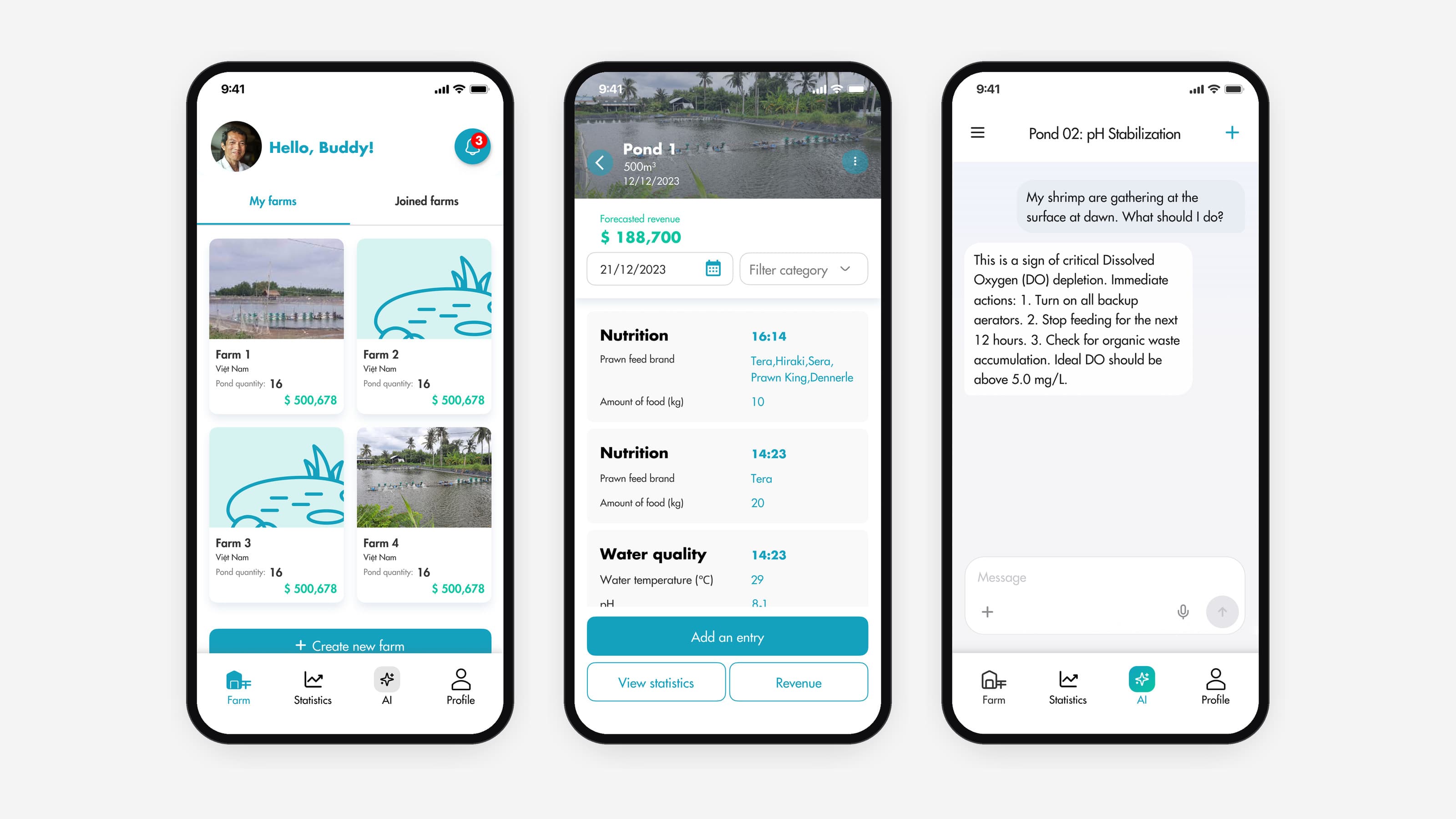
Three Aotomatic screens: the farm list with four farm cards and the AI tab in the tab bar, a pond page listing the day's nutrition and water quality entries above Add an entry, and the AI chat answering a question about shrimp gathering at the surface at dawn

One question per screen.

The first version

The app was already in production when ARIS took it over. Logging one pond for one day took 24 screens: the pond page, a menu, four section title screens, 17 questions and a closing screen.
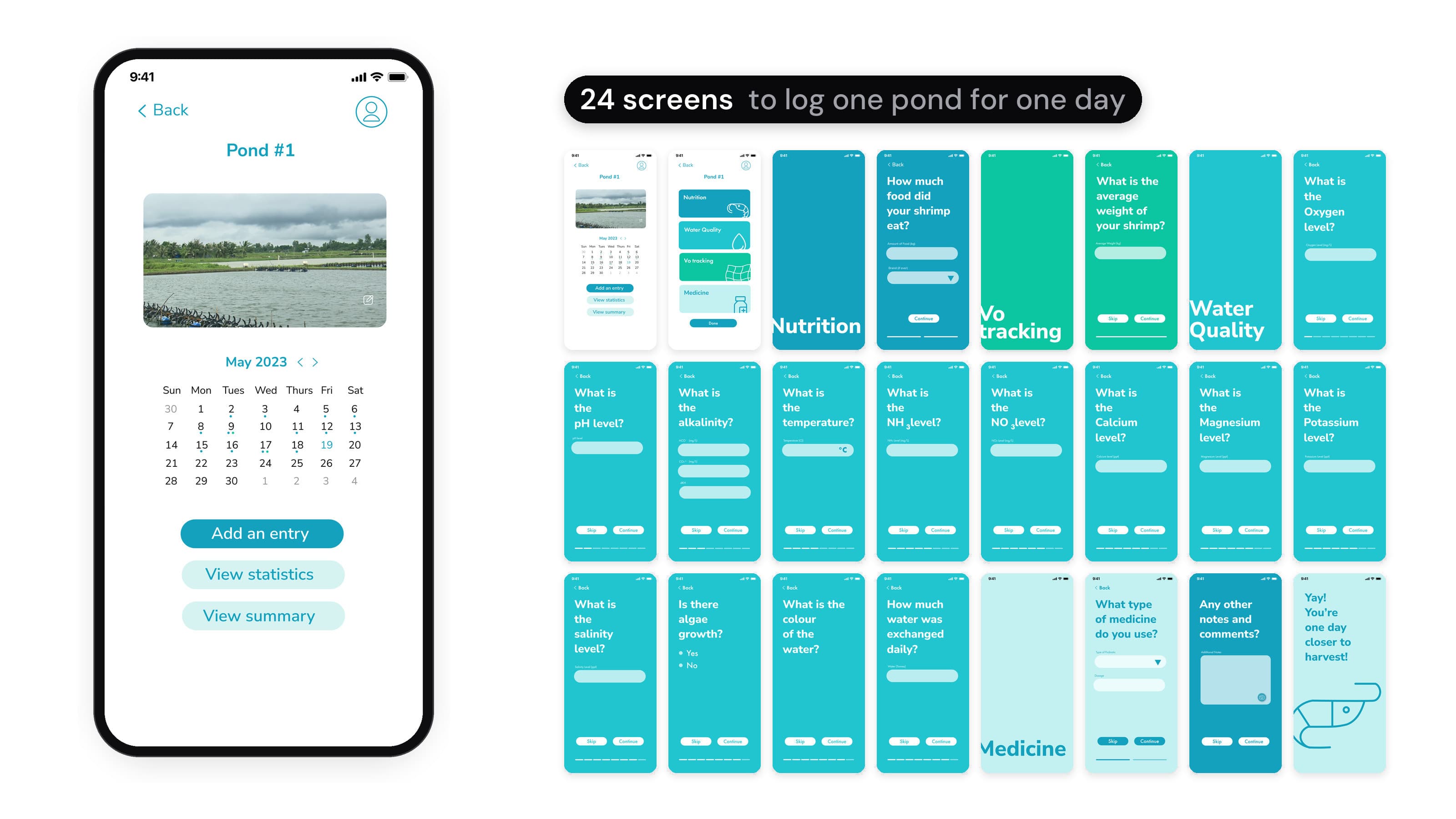
The first version of the app, built by another team. On the left, a phone steps through one day's entry: the pond page with a calendar and Add an entry, a menu of four sections, then one screen per question with Skip and Continue, such as the oxygen, pH and alkalinity levels, each section opened by a full-screen title, and a closing screen that says Yay! You're one day closer to harvest! On the right, all 24 screens side by side.
First version, by another team

Where a day's entry lost time.

  • 01One reading per screenWater quality alone asked 13 readings on 13 screens, plus a title screen.
  • 02A calendar, not the dayThe pond page opened on a calendar. What had been logged that day wasn't on it.
  • 03Tests kept apartTest results sat in a separate Testing area on the farm page, outside the daily entry.

Group the questions by the job.

Approach

I was the only UX/UI designer on the ARIS side, working with 2 mobile devs, 2 web devs and 2 QC.

  1. 01Audit the first versionWent through every screen of the live app and listed each question it asked and where it led.
  2. 02Group them into formsPut the questions into the five forms a farmer fills in at the pond: nutrition, water quality, feeding tray (vó), medicine and RAPID test results.
  3. 03Check with engineeringChecked low-fidelity flows with the mobile and web devs for feasibility before handoff.
Considered and rejectedKeep one question per screen and restyle it. Faster to build, but one day's entry would still take 24 screens.

Before and after.

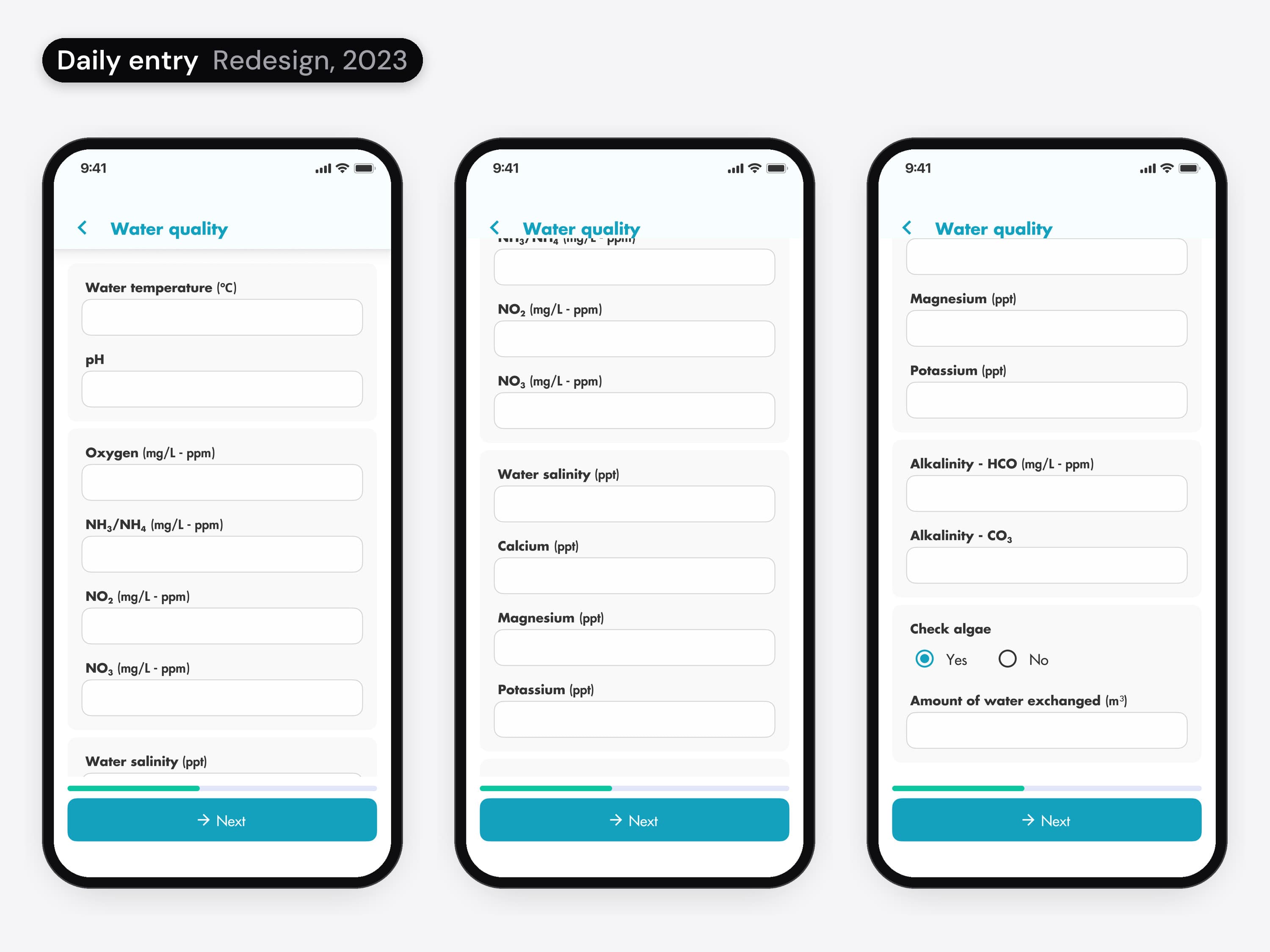
Daily entry before and after. First version, by another team: three teal screens that each ask one question, the oxygen, pH and alkalinity levels, with Skip and Continue. Redesign, 2023: the water quality form in three phones, from the top to its last field, with every reading as a field, from water temperature and pH to alkalinity, check algae and the amount of water exchanged, and Next pinned at the bottom.
01 / 04 · Mobile app

Water quality in one form

One water quality form with every reading in one scroll, and Next pinned at the bottom.

  • Daily entry before and after. First version, by another team: three teal screens that each ask one question, the oxygen, pH and alkalinity levels, with Skip and Continue. Redesign, 2023: the water quality form in three phones, from the top to its last field, with every reading as a field, from water temperature and pH to alkalinity, check algae and the amount of water exchanged, and Next pinned at the bottom.
    01 / 04 · Mobile app

    Water quality in one form.

    One water quality form with every reading in one scroll, and Next pinned at the bottom.
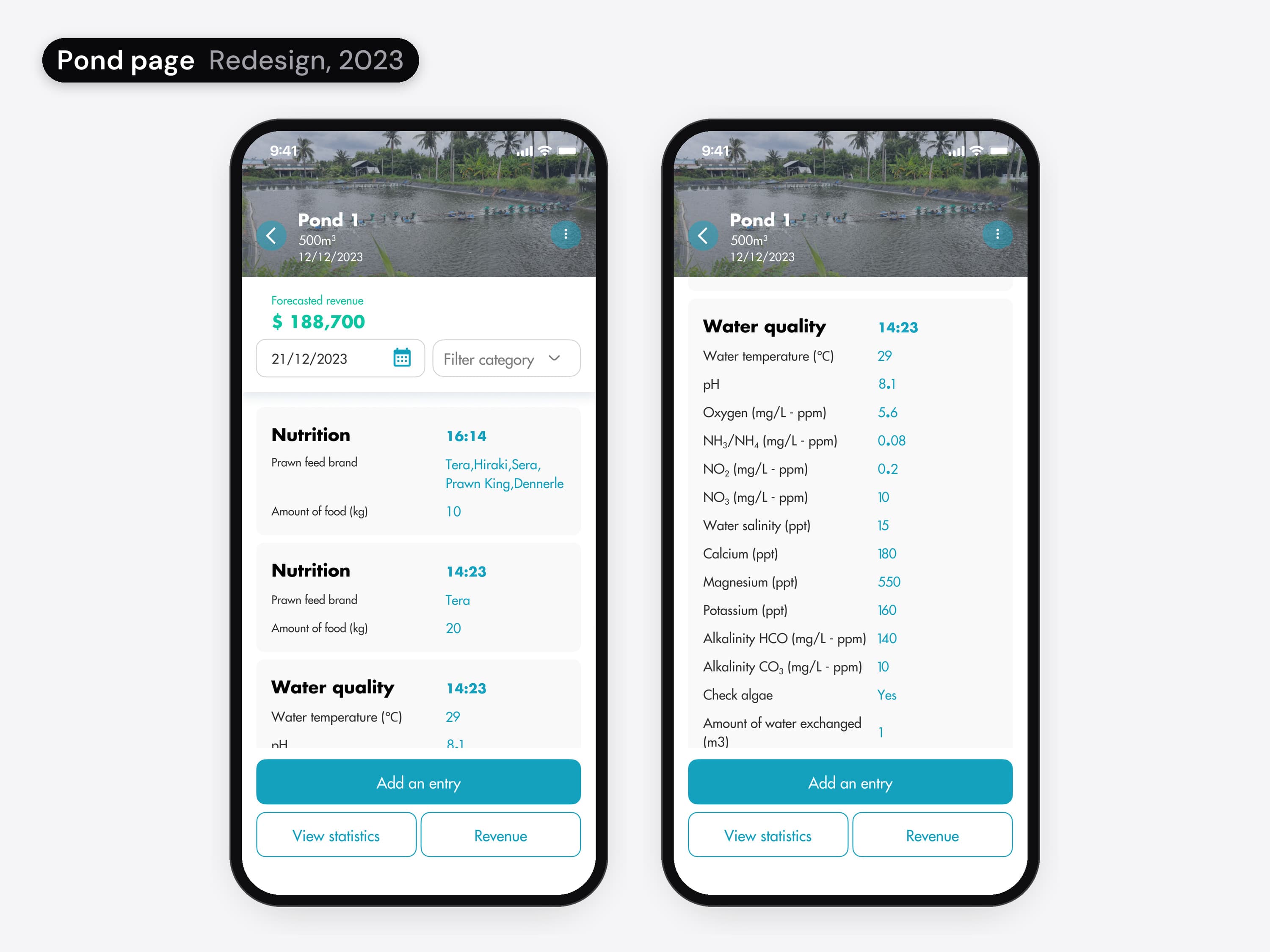
  • The pond page before and after. First version, by another team: a pond photo, a month calendar and three buttons, Add an entry, View statistics and View summary, then a menu of four coloured sections. Redesign, 2023: the pond page with its photo header, a date picker and the day's entries listed by section and time, nutrition and water quality, with Add an entry, View statistics and Revenue at the bottom.
    02 / 04 · Mobile app

    The day's entries on the pond page.

    The pond page lists what was logged that day, by section and time, with Add an entry at the bottom.
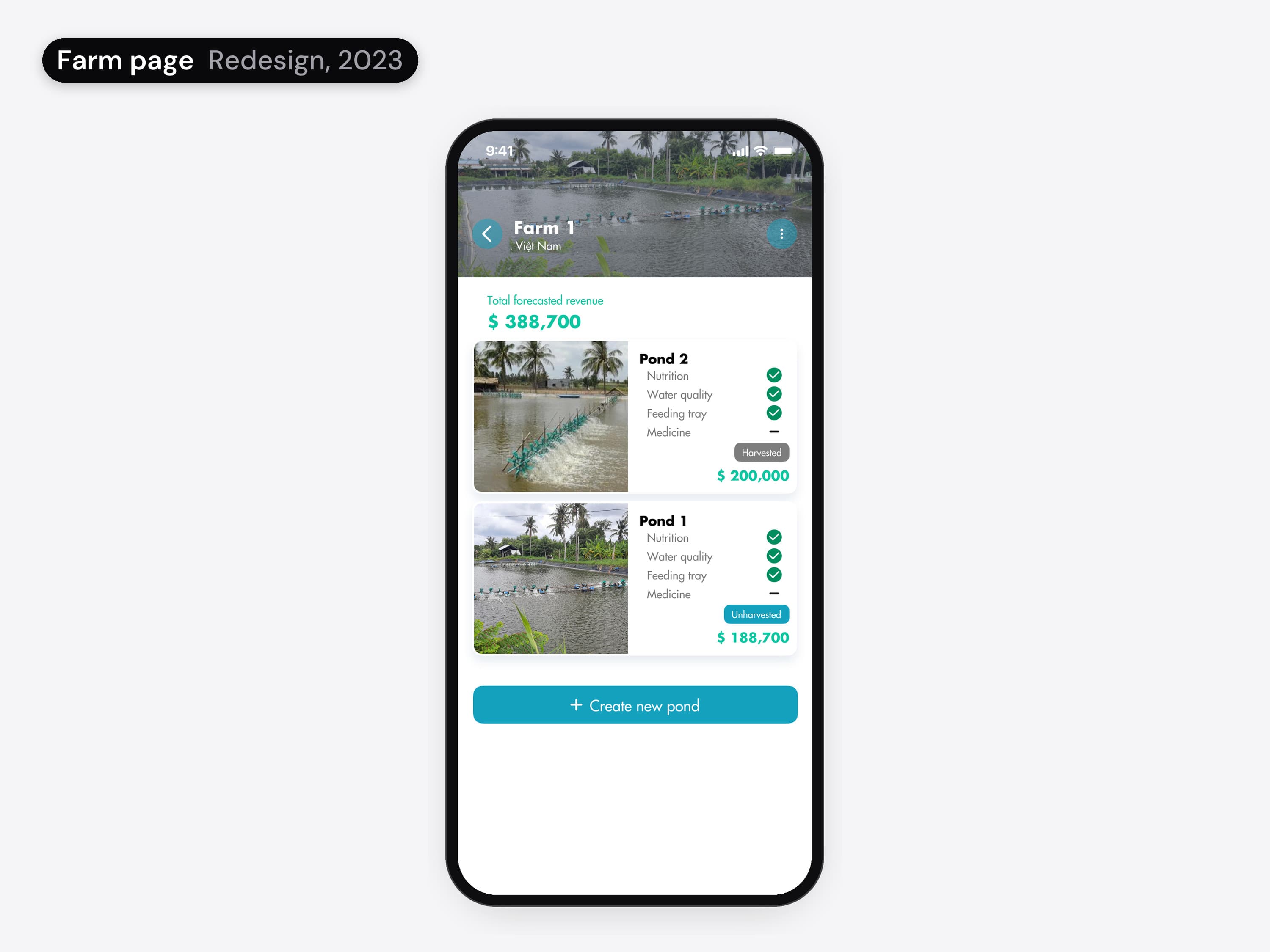
  • The farm page before and after. First version, by another team: pond tiles with only a name, one of them locked, and a separate Testing area with Test results and Testing locations. Redesign, 2023: a farm photo header with the forecast revenue, and a card per pond with its photo, its revenue and a green tick next to each section logged, nutrition, water quality, feeding tray and medicine, above Create new pond.
    03 / 04 · Mobile app

    Every pond's day at a glance.

    A card per pond, with a tick for each section logged that day. Test results moved into the daily entry as the RAPID test form.
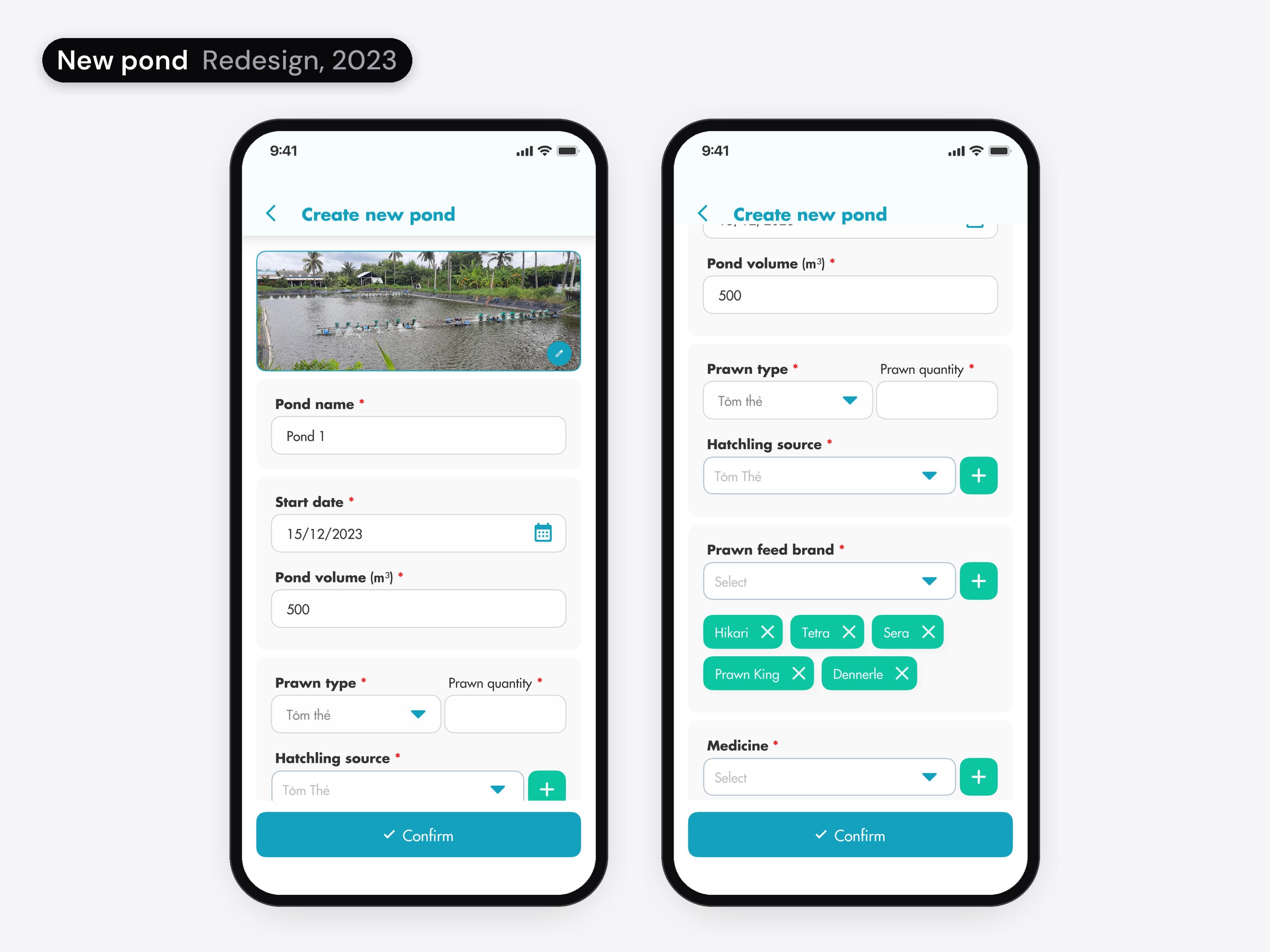
  • Setting up a pond before and after. First version, by another team: three teal screens that each ask one question, What would you like to name your pond?, How old are your shrimp? and Where did you get your shrimp?, each with Continue. Redesign, 2023: Create new pond, one form shown at the top and scrolled down, with a photo, pond name, start date, pond volume, prawn type and quantity, hatching source, feed brands and medicine, and Confirm at the bottom.
    04 / 04 · Mobile app

    Setup in one form.

    Creating a pond is one form, from its photo to its feed brands and medicine.

Inside the 2023 app.
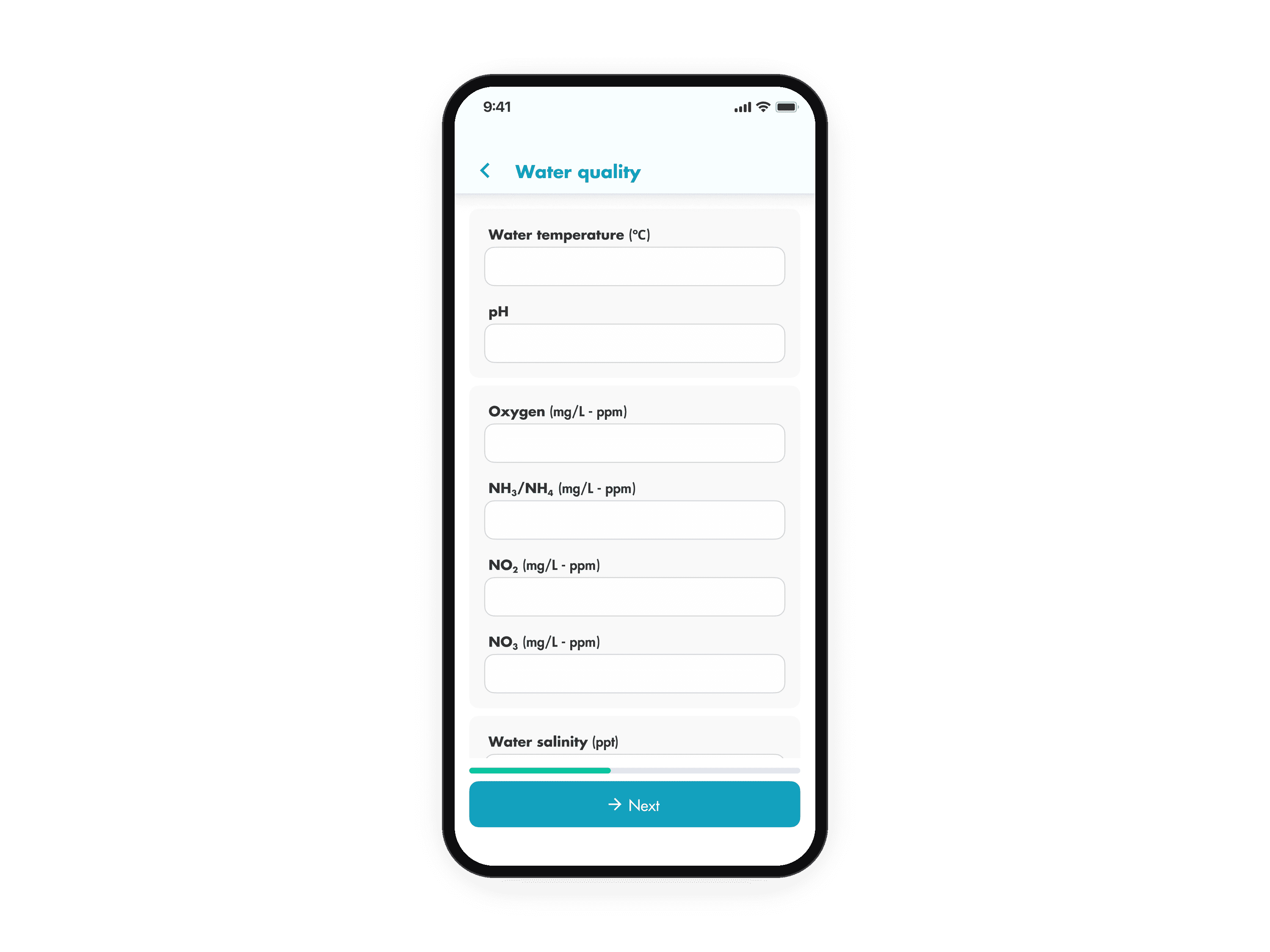
The water quality form in the phone, with every reading as a field and Next at the bottom. The animation starts on the pond page, taps Add an entry, then goes through the five forms, nutrition, water quality, feeding tray, medicine and RAPID test results, tapping Next on each, and ends on the confirm screen.
01 / 03 · Mobile app

Log one pond for one day

From the pond page: Add an entry, five forms in a row, then a confirm screen. Seven screens in all, against 24 in the first version.

  • The water quality form in the phone, with every reading as a field and Next at the bottom. The animation starts on the pond page, taps Add an entry, then goes through the five forms, nutrition, water quality, feeding tray, medicine and RAPID test results, tapping Next on each, and ends on the confirm screen.
    01 / 03 · Mobile app

    Log one pond for one day. From the pond page: Add an entry, five forms in a row, then a confirm screen. Seven screens in all, against 24 in the first version.

    The whole entry flow: the five forms and the confirm screen.
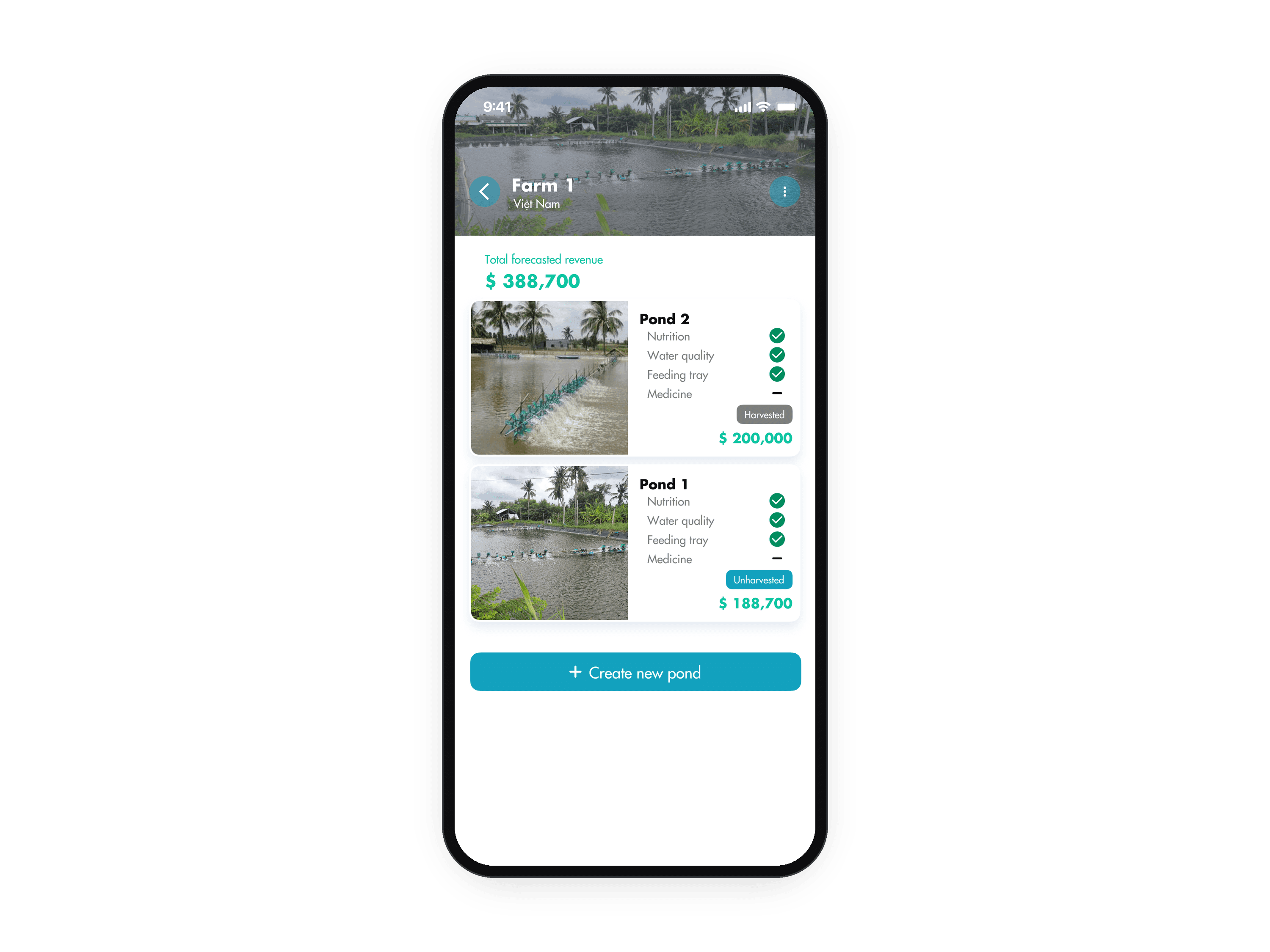
  • A farm page in the phone: the farm photo with its forecast revenue and a card per pond, each with a tick for every section logged that day. The animation starts on the farm list, opens Farm 1, then opens Pond 1 and lands on its pond page.
    02 / 03 · Mobile app

    From a farm to one of its ponds. The farm list, a farm and its ponds, then the pond page with the day's entries.

    The farm list, the farm page and the pond page.
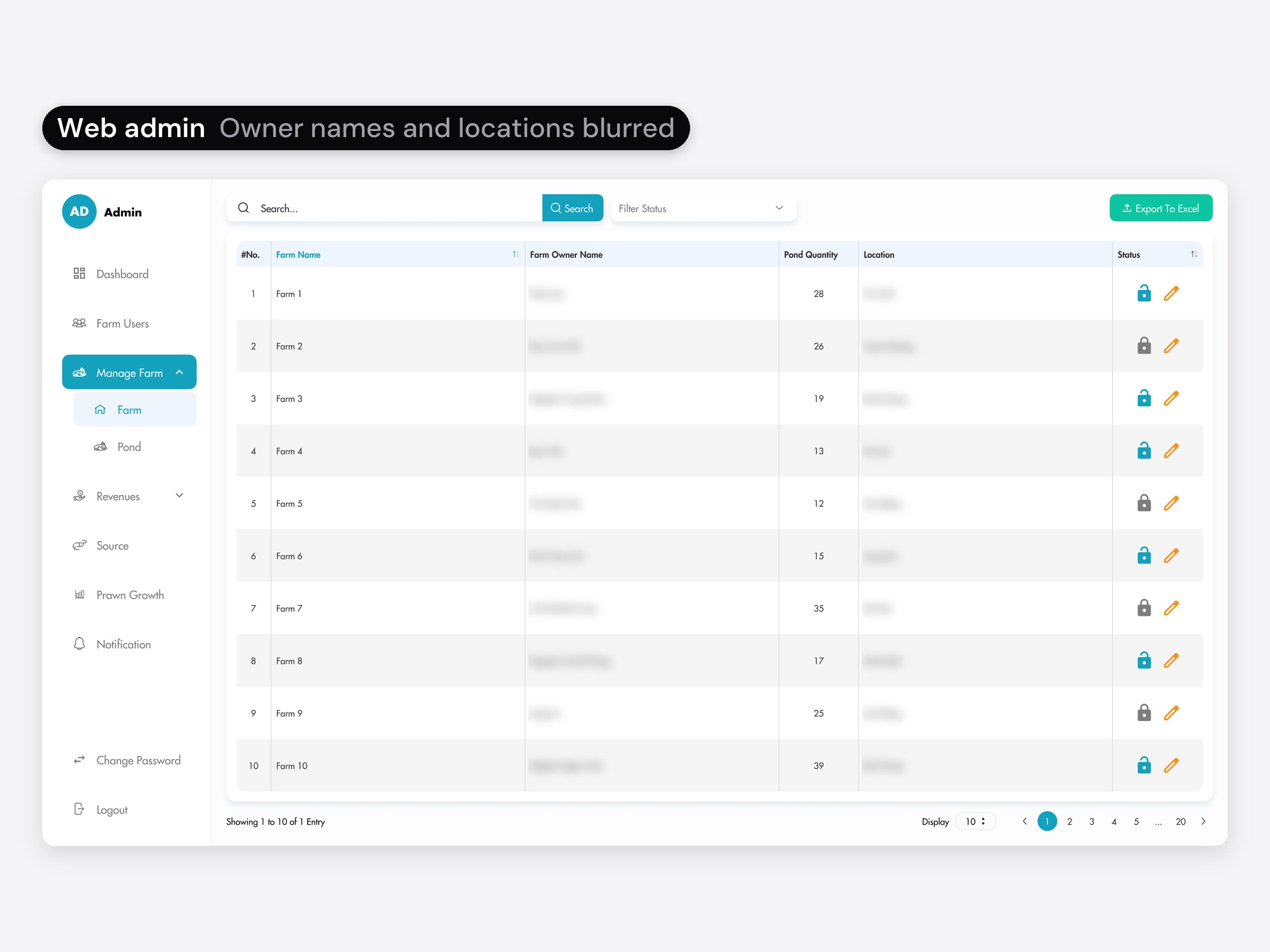
  • The web admin's farm list: a table of farms with the owner, the number of ponds, the location, and a lock and an edit button on each row; owner names and locations are blurred. The animation opens Pond under Manage Farm in the side menu: every pond with its farm, start date and a Harvested or Unharvested tag. Then it opens Revenues: a table per pond with prawn quantity, current weight, price, yield and revenue.
    03 / 03 · Web admin

    Farms, ponds and revenue in the admin. The admin lists every farm and every pond, with each pond's condition, and a revenue table per pond: quantity, weight, price and yield.

    The whole admin, including the side menu, the farm and pond tables and the revenue table.

The client's teal and font.
The system around them is mine.

Design system

Forte Biotech brought the colour tone and the SFU Futura typeface. I built the colour and text styles, the type scale, the shadows and the components on top. For this case they are recreated in Figma as variables.
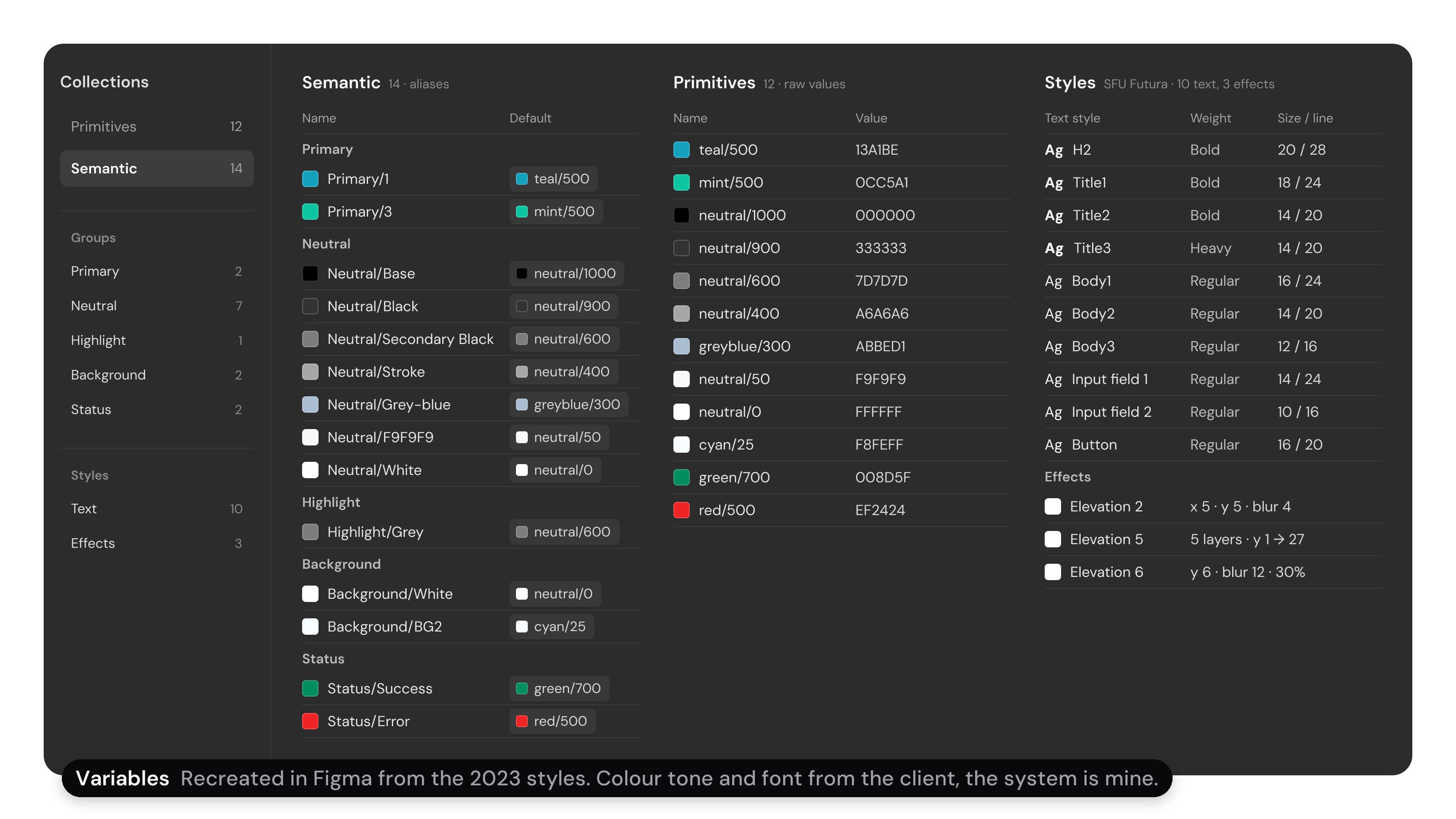
The app's colour variables, recreated in Figma for this case and shown as a dark Variables panel: 14 semantic tokens, such as Primary/1 pointing at teal/500 and Background/BG2 at cyan/25; the 12 primitives with their values, such as teal/500 at 13A1BE and mint/500 at 0CC5A1; and the styles, ten SFU Futura text styles from H2 bold 20/28 to Input field 2 at 10/16, and three elevation shadows

Revenue and profit.
Entries you can edit.

Change request, Feb 2024

A short add-on: the pond page shows each entry time as a column you can edit, and revenue and profit each got a form.
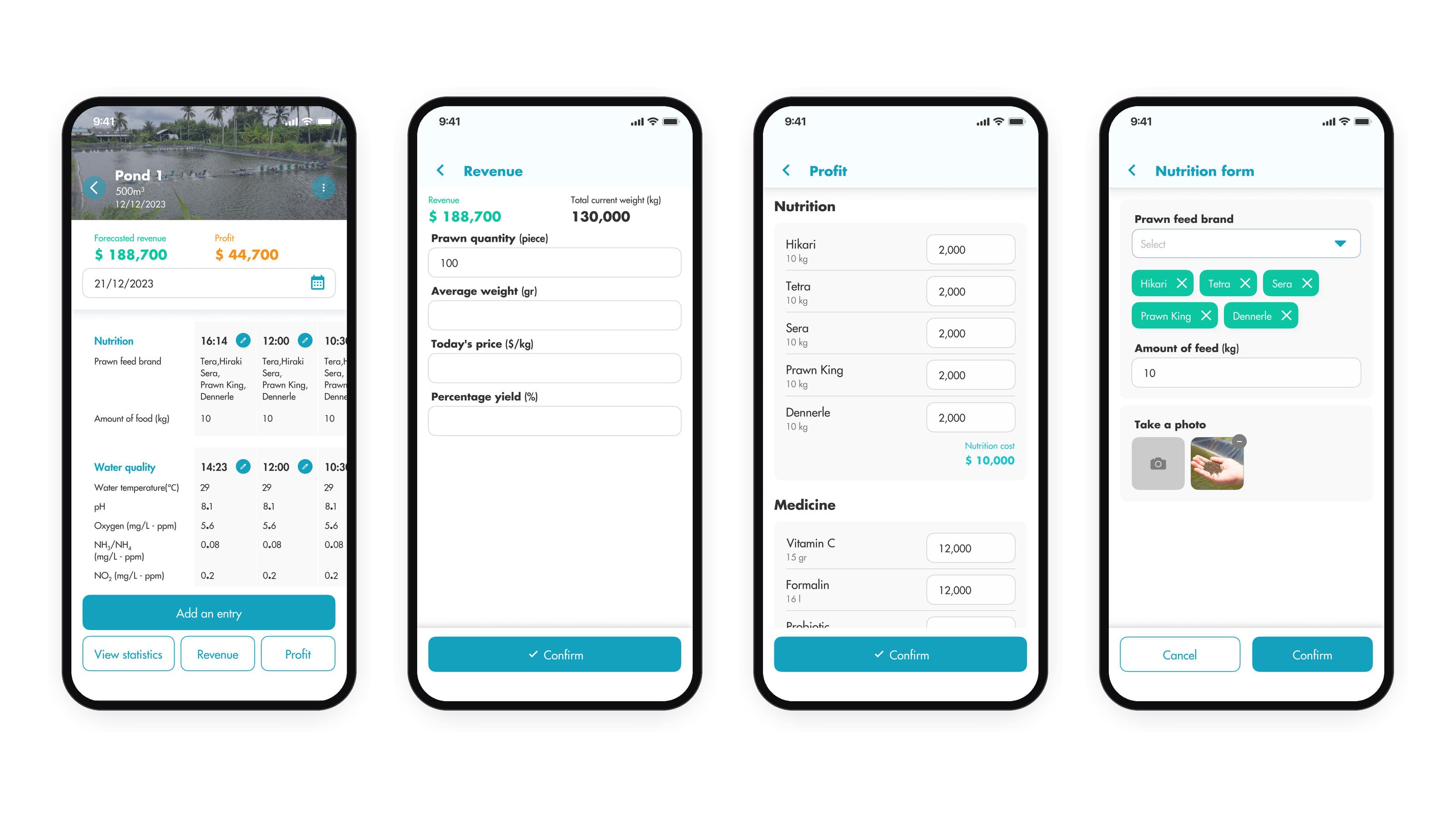
Four phone screens from the February 2024 change request: the pond page with forecast revenue and profit and the day's entries as columns by time, each with an edit button; the Revenue form with prawn quantity, average weight, today's price and percentage yield; the Profit form listing feed costs and medicine costs, such as Vitamin C and Formalin; and the nutrition form in edit mode with feed brands and a photo

An AI chat.
Photos and RAPID PLUS too.

Change requests, 2026

Add-ons the client asked for, shipped in 2026, inside the same design system.
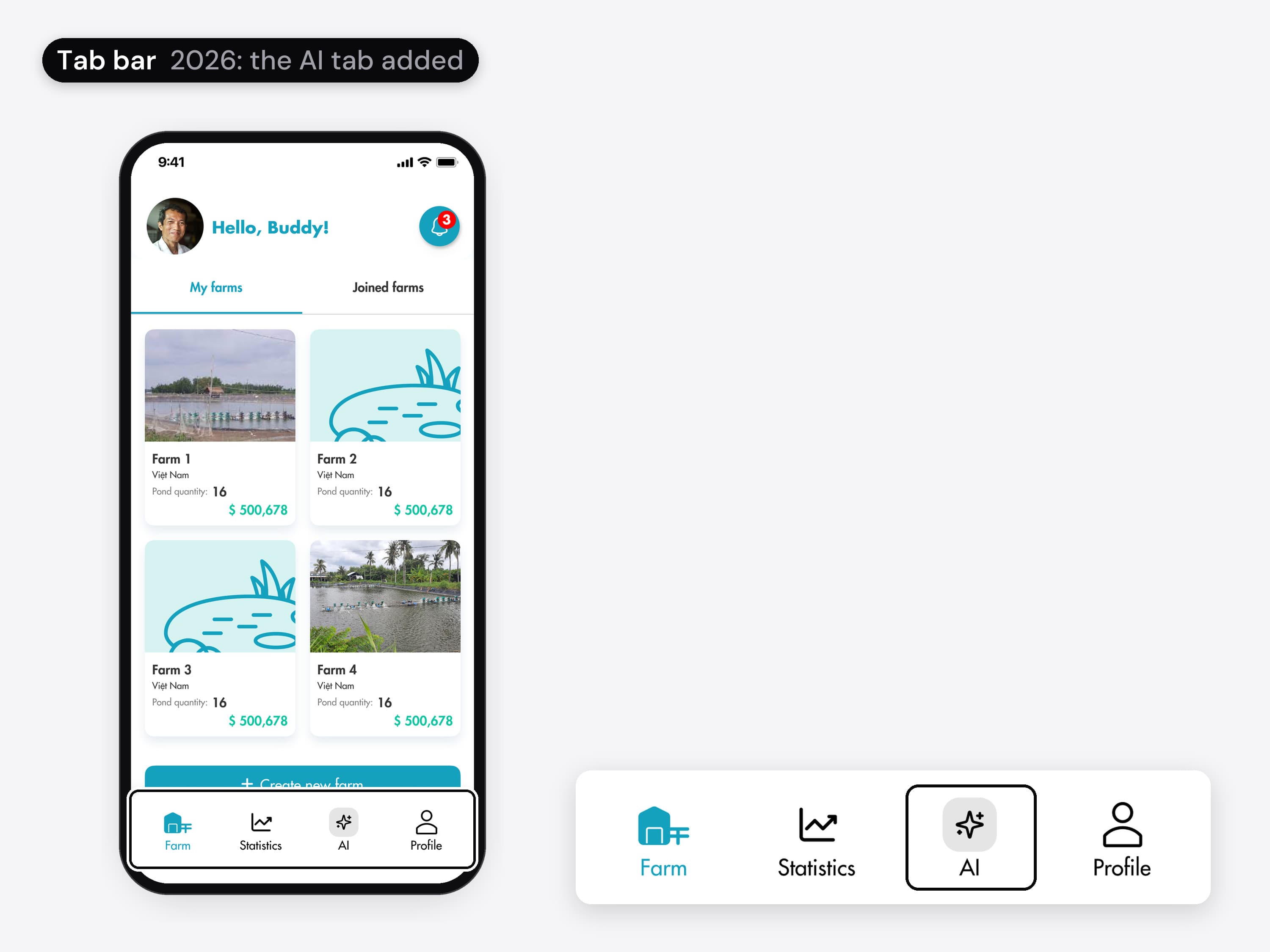
The farm list before and after, with its tab bar ringed and shown magnified beside the phone. Before: the tab bar has Farm, Statistics and Profile. 2026: an AI tab with a sparkle icon sits between Statistics and Profile, ringed in the magnified bar.
01 / 07 · Mobile app

A tab for the AI chat

An AI tab between Statistics and Profile.
  • The farm list before and after, with its tab bar ringed and shown magnified beside the phone. Before: the tab bar has Farm, Statistics and Profile. 2026: an AI tab with a sparkle icon sits between Statistics and Profile, ringed in the magnified bar.
    01 / 07 · Mobile app

    A tab for the AI chat.

    An AI tab between Statistics and Profile.

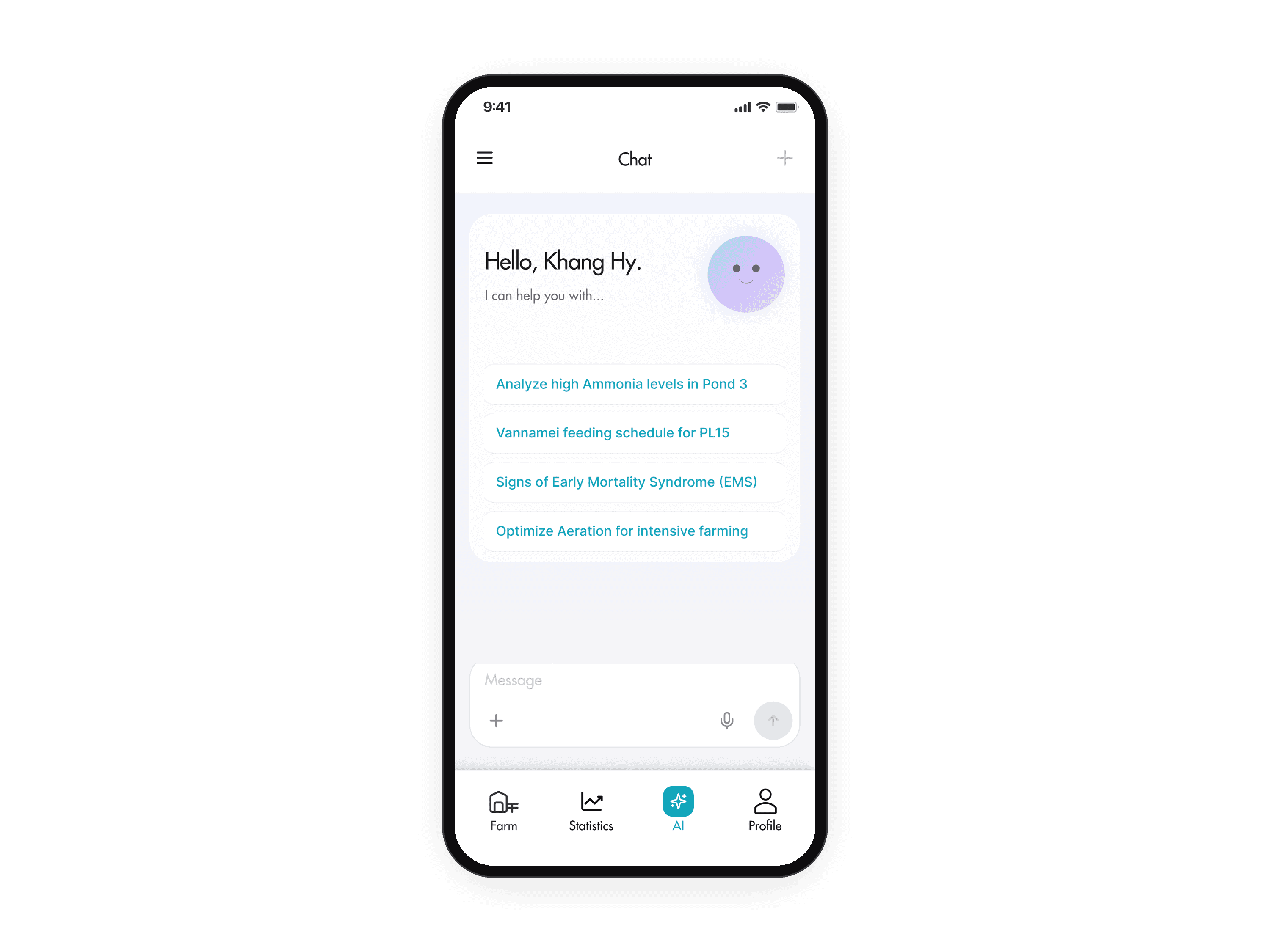
  • The AI chat's start screen, rebuilt for this case from the real design's parts: Hello, Khang Hy. with an avatar, and four suggested questions, such as Analyze high Ammonia levels in Pond 3. The animation taps that question; it appears as a message, with Thinking and a Stop generating button.
    02 / 07 · Mobile app · Rebuilt

    Ask with one tap. The chat gives farmers a place to ask about their own pond data, at any hour. It opens with suggested questions about the farm; one tap sends one, and the answer can be stopped on its way.

    Forte Biotech (change request)
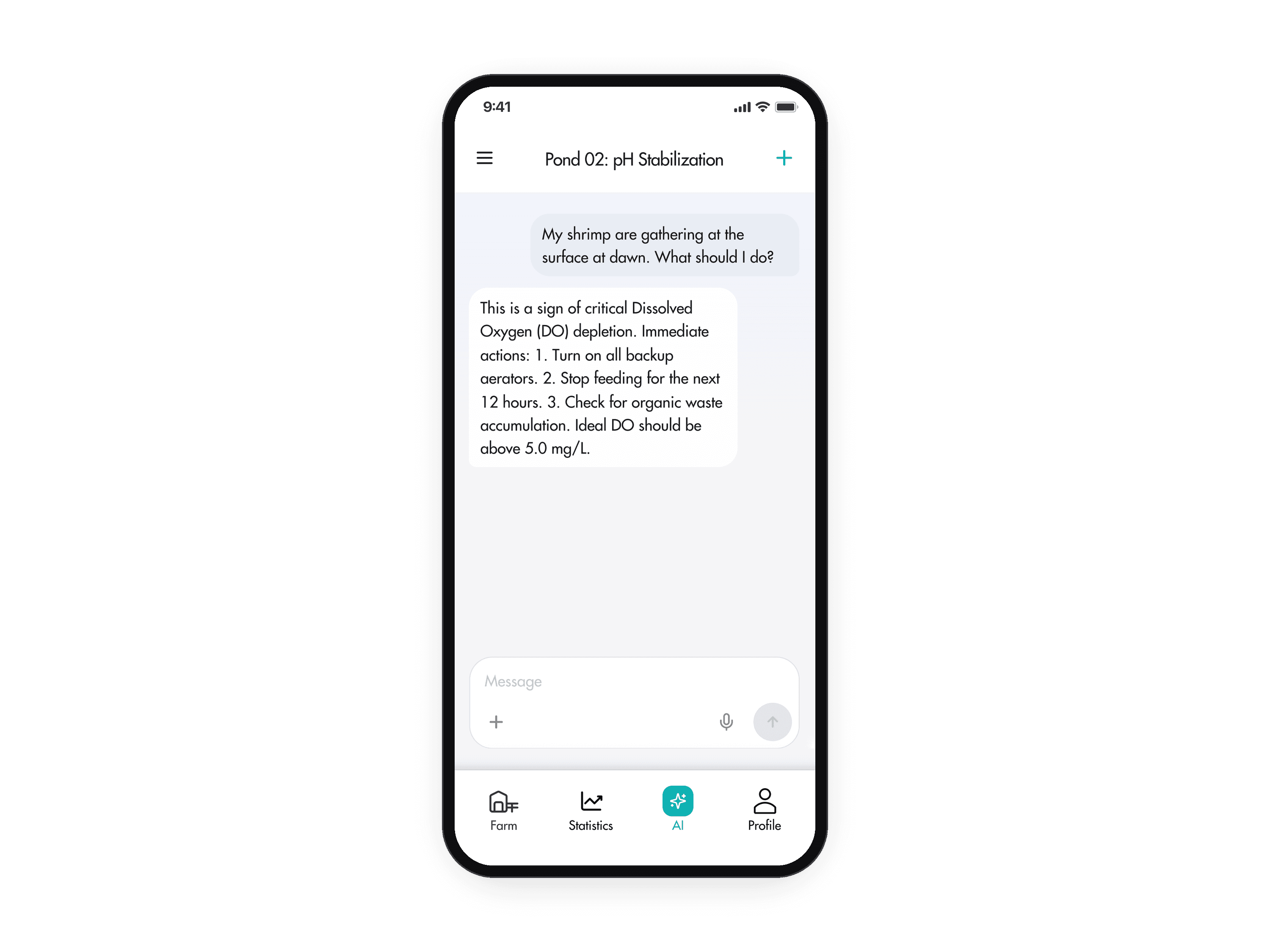
  • A chat titled Pond 02: pH Stabilization: the farmer asks why the shrimp gather at the surface at dawn, and the answer explains it is a sign of low dissolved oxygen and lists what to do. The animation starts on the chat's start screen, opens the menu, Chat History slides over with a search field, New chat and five past chats, and opening the first one shows its answer.
    03 / 07 · Mobile app · Rebuilt

    Go back to a past chat. The menu opens Chat History, where past chats are named by topic and can be searched.

    Forte Biotech (change request)
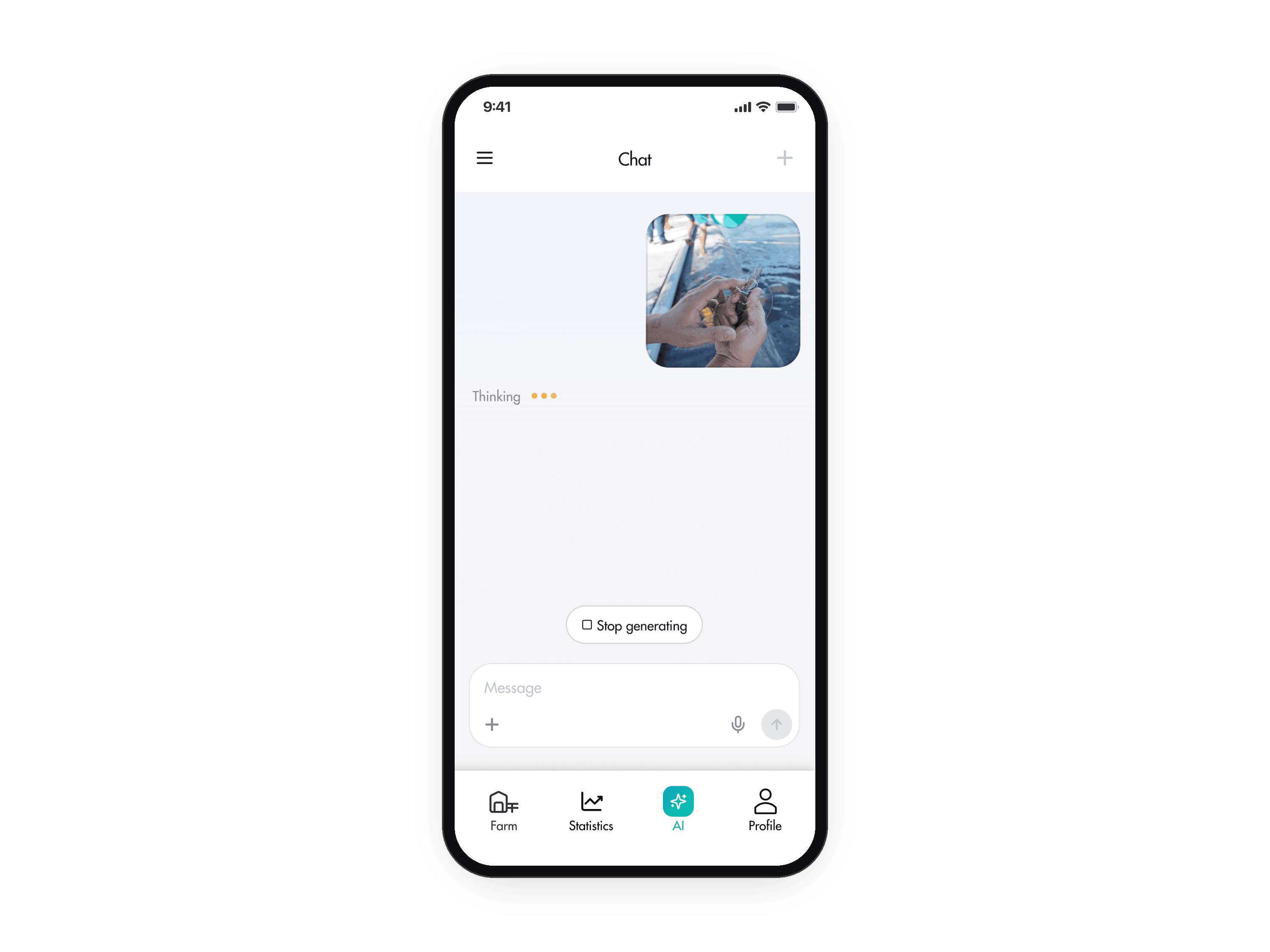
  • The chat after sending a photo, rebuilt for this case from the real design's parts: the photo sits in the conversation as a message, with Thinking below it. The animation taps the plus button in the message box, picks Upload Image from the menu, the photo appears in the message box, and the send button sends it.
    04 / 07 · Mobile app · Rebuilt

    Send a photo with the question. A sick shrimp is easier to show than to describe, so the chat takes photos.

    Forte Biotech (change request)
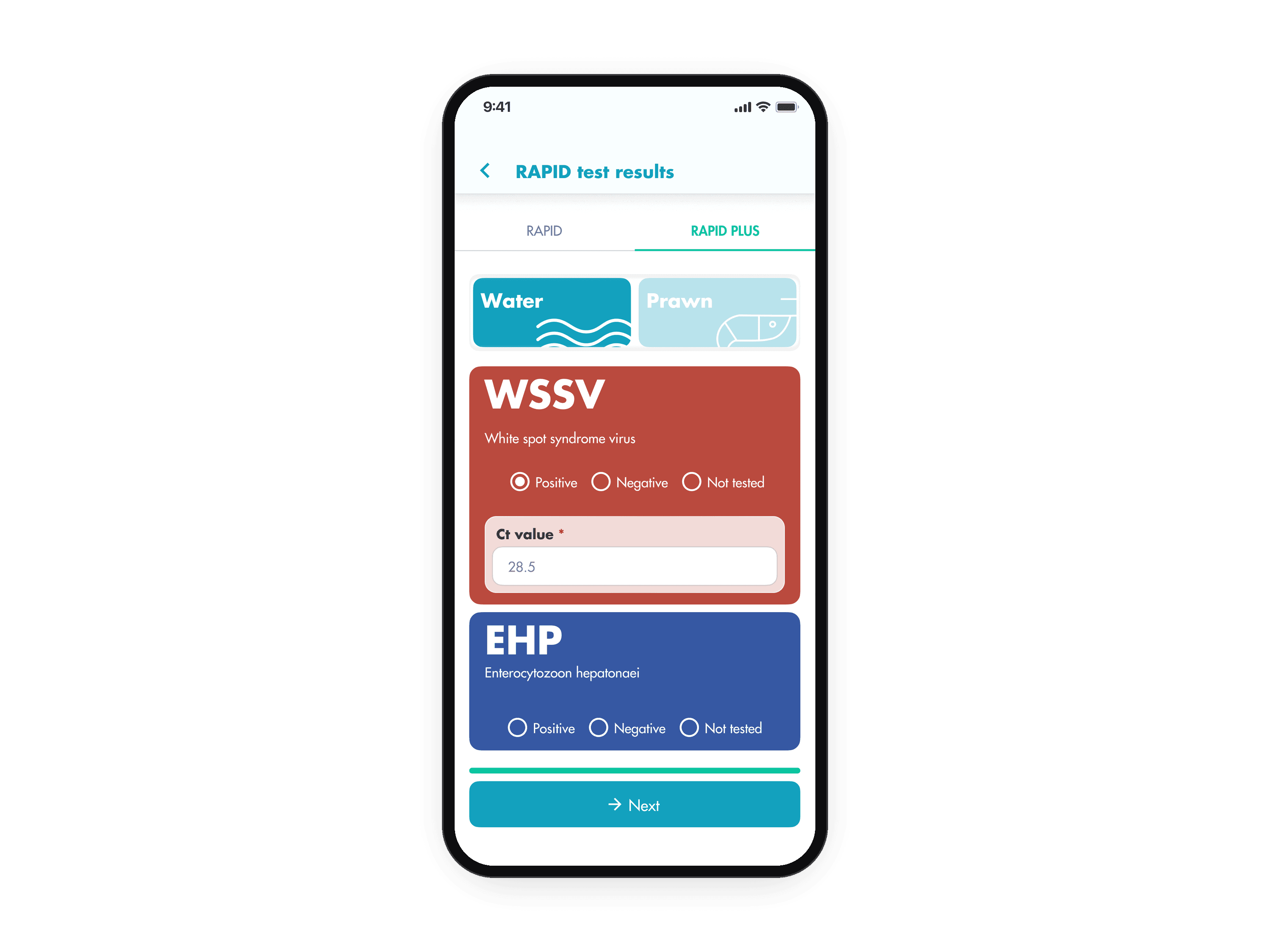
  • The RAPID PLUS tab of RAPID test results: a Water or Prawn switch, then a card per disease, WSSV and EHP, each Positive, Negative or Not tested, with a Ct value field under a positive result. The animation switches from the RAPID tab to RAPID PLUS, types a Ct value, a hint says the value typically ranges from 10 to 40, and Next leads to the confirm screen with the RAPID PLUS results.
    05 / 07 · Mobile app

    Disease tests with a Ct value. RAPID is Forte Biotech's disease test. RAPID PLUS is the more advanced test, with the lab's Ct value: the lower it is, the more virus in the sample. In its tab, each disease is Positive, Negative or Not tested.

    Forte Biotech (change request)
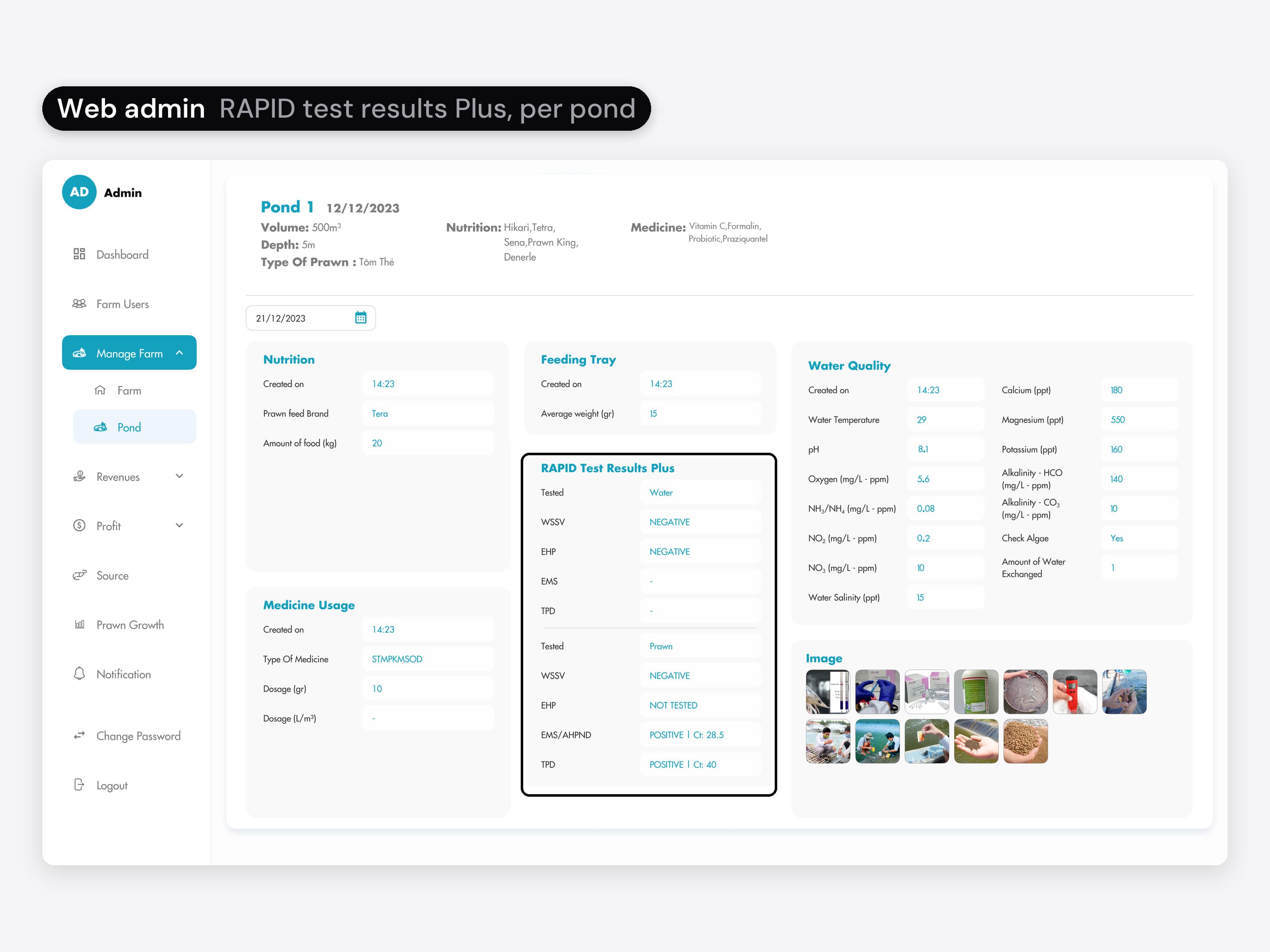
  • The web admin's pond page: the pond's volume, depth, prawn type, feed and medicine, then boxes for nutrition, feeding tray, water quality, medicine usage and photos. A ring marks the RAPID Test Results Plus box, with the water and prawn results per disease, such as POSITIVE | Ct: 28.5.
    06 / 07 · Web admin

    The same results in the admin. Each pond's page in the web admin shows the RAPID PLUS results next to the day's other entries.

    Forte Biotech (change request)
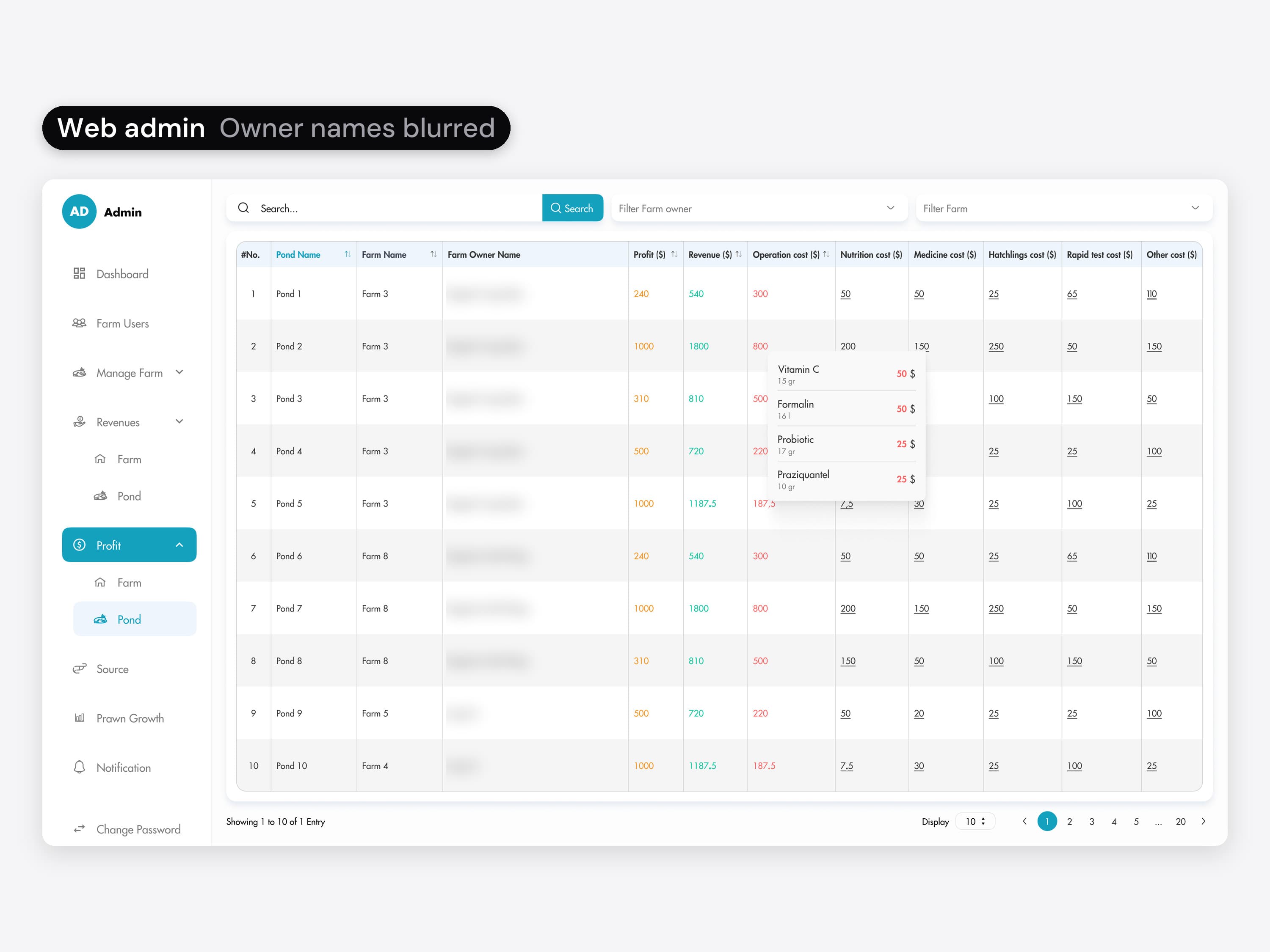
  • The web admin's Profit page per pond: each pond with its profit, revenue and operation cost, then its costs by type, nutrition, medicine, hatchlings, RAPID tests and other; owner names are blurred. Pond 2's medicine cost is open in a small list: Vitamin C, Formalin, Probiotic and Praziquantel, each with its amount and price. The animation starts on Profit per farm, with each farm's revenue, operation cost and profit, opens Pond under Profit in the side menu, clicks Pond 4's nutrition cost to list its five feed brands, then Pond 2's medicine cost.
    07 / 07 · Web admin

    Profit per farm and per pond. In the web admin, Profit lists each farm's revenue, operation cost and profit, then each pond's, with the cost split into nutrition, medicine, hatchlings, RAPID tests and other. Clicking a cost shows what it is made of.

    Forte Biotech (change request)

The store pictures.
Mine too.

On the App Store

I designed the App Store preview images.
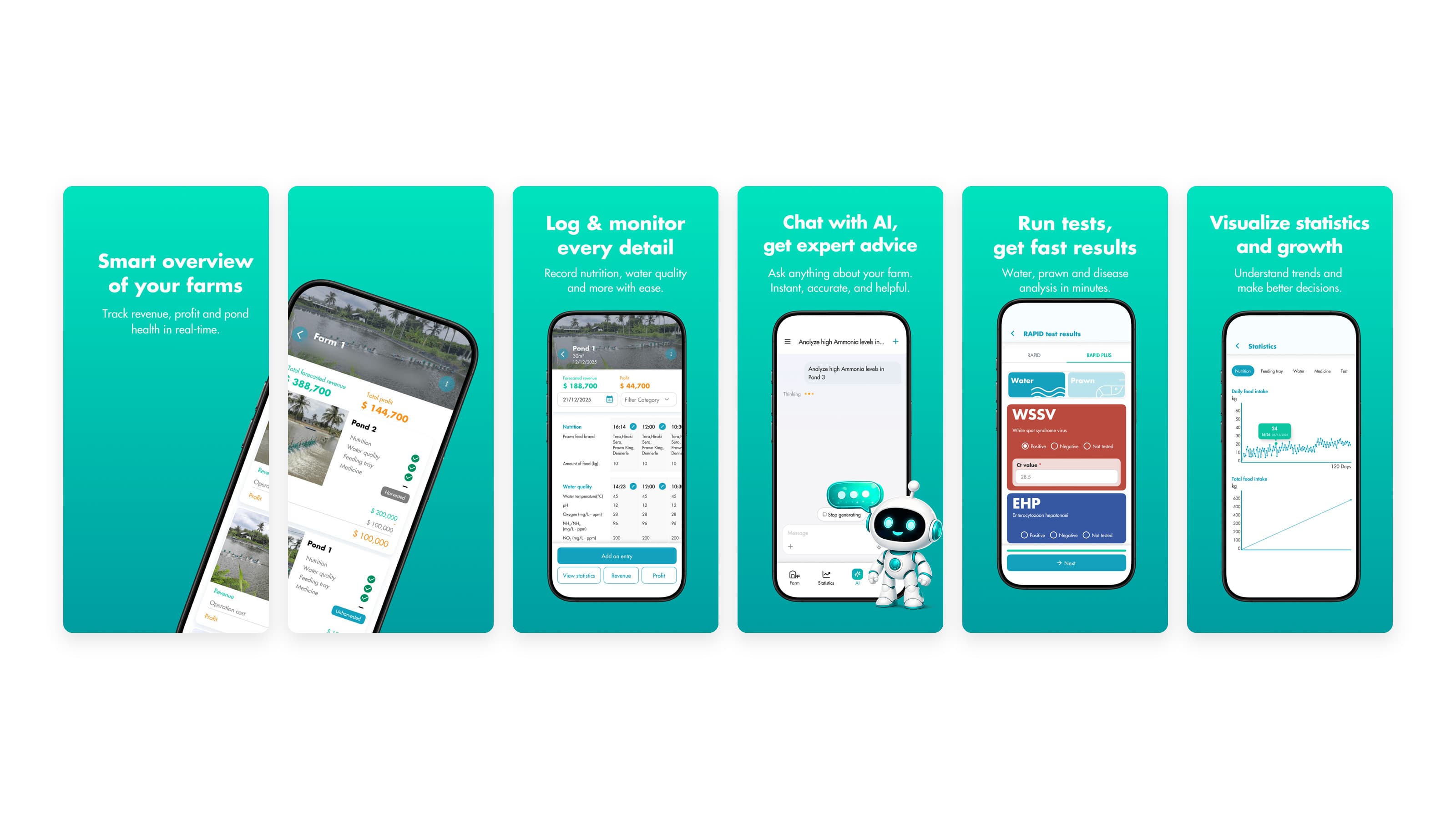
The six App Store preview images side by side with even gaps, teal, in store order (the first two share one tilted phone that runs across the gap): Smart overview of your farms; a tilted phone showing a farm and its ponds, which continues from the first preview; Log & monitor every detail; Chat with AI, get expert advice, with a robot mascot; Run tests, get fast results; and Visualize statistics and growth
Address blurred

When something goes wrong.

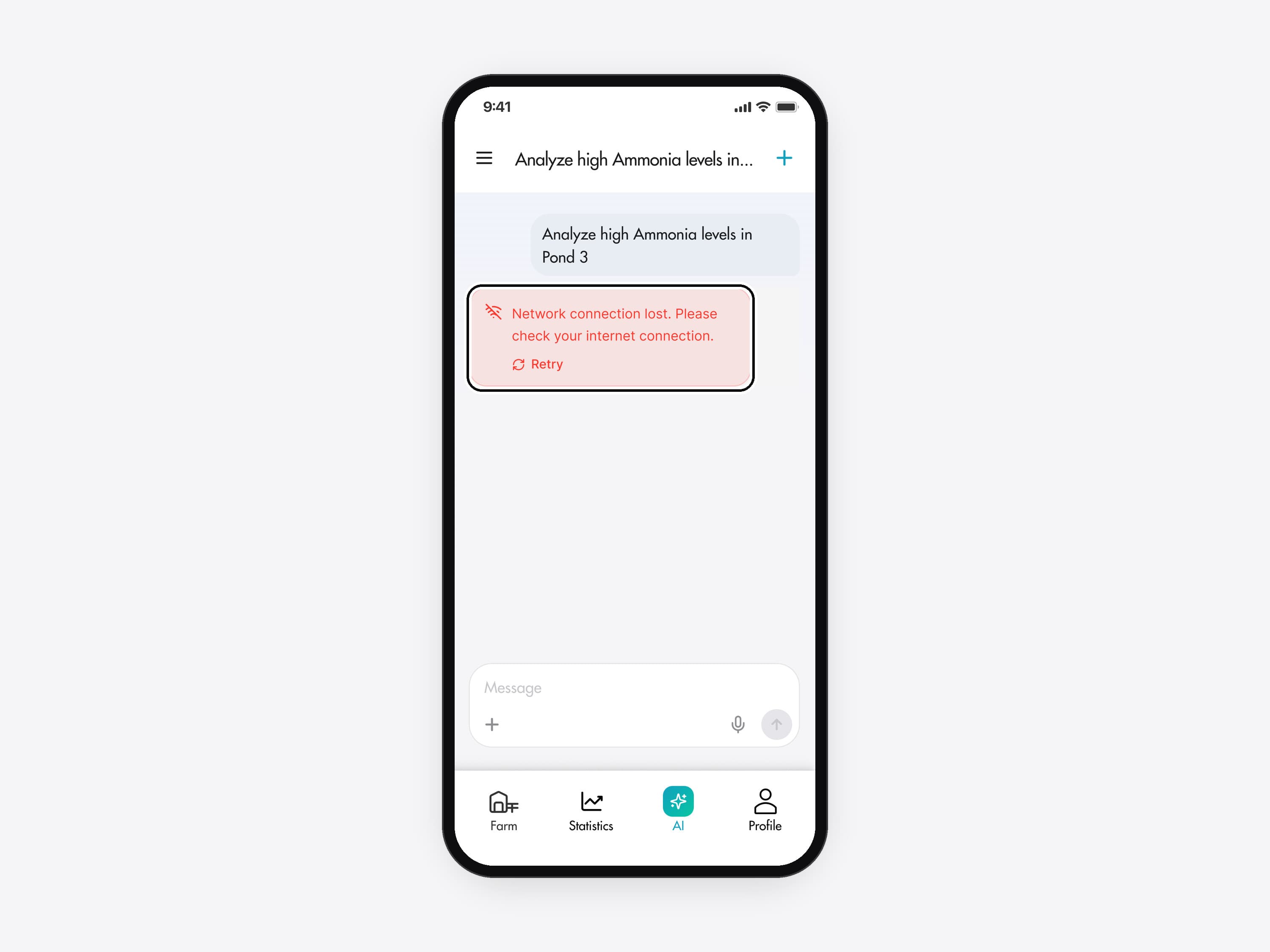
The AI chat after a question, rebuilt for this case from the real design's parts. A ring marks a light red message where the answer would start: Network connection lost. Please check your internet connection., with a Retry button under it.
01 / 03 · Mobile app · Rebuilt

When the connection drops

If the connection drops, the chat says so where the answer would appear, with a Retry button under the message.

  • The AI chat after a question, rebuilt for this case from the real design's parts. A ring marks a light red message where the answer would start: Network connection lost. Please check your internet connection., with a Retry button under it.
    01 / 03 · Mobile app · Rebuilt

    When the connection drops. If the connection drops, the chat says so where the answer would appear, with a Retry button under the message.

    The error message and its Retry button.
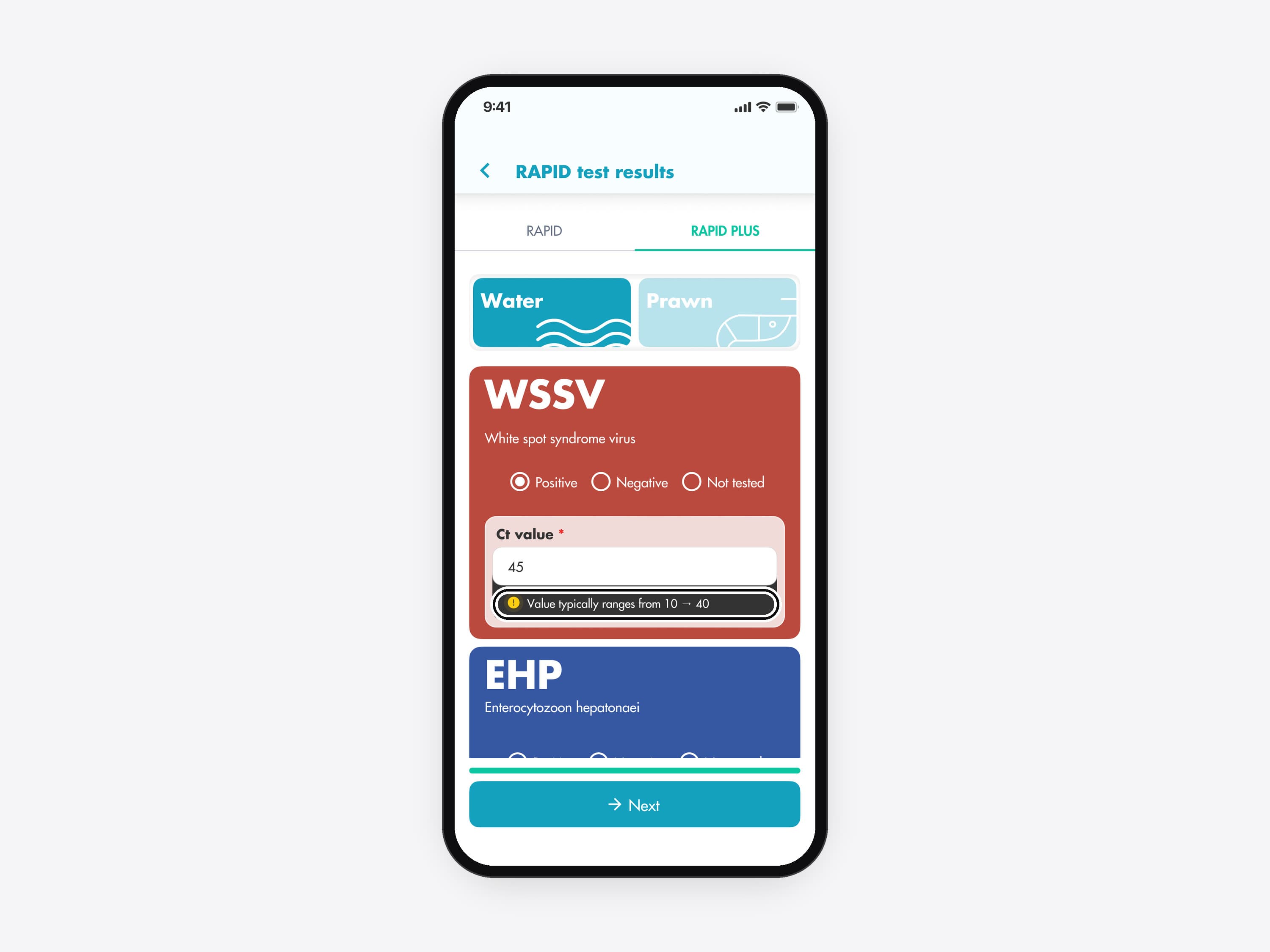
  • The RAPID PLUS form with 45 typed as the WSSV Ct value. A ring marks the dark hint under the field: Value typically ranges from 10 → 40.
    02 / 03 · Mobile app

    A Ct value outside the usual range. Type a Ct value outside the usual 10 to 40, like 45, and a hint appears under the field. Next still works, because a lab sheet can report an unusual value.

    The hint under the field.
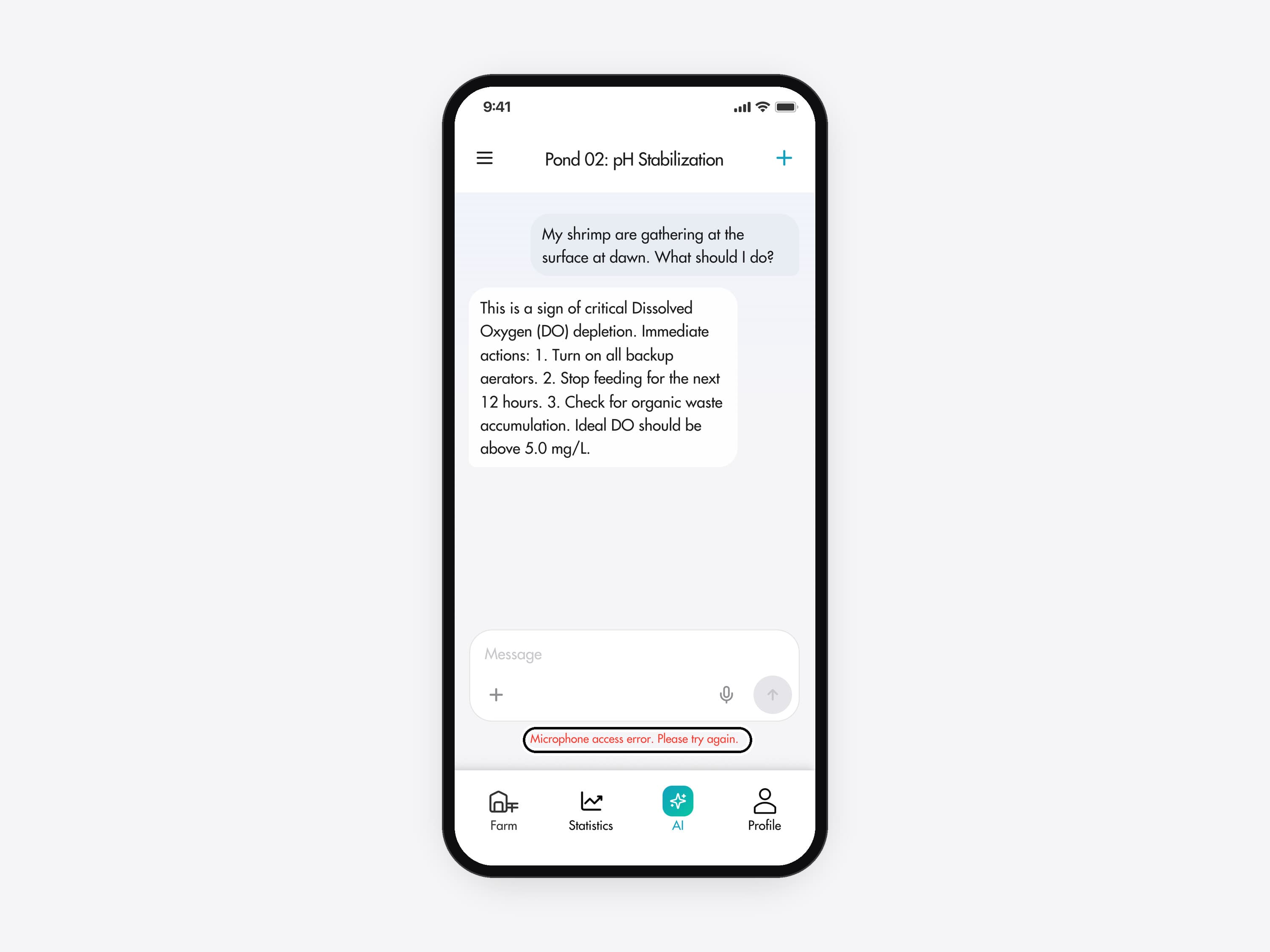
  • The AI chat with an answer on screen. A ring marks a red line under the message box: Microphone access error. Please try again.
    03 / 03 · Mobile app

    When the microphone fails. If voice input can't use the microphone, a red line under the message box says so.

    The message box's error state.

What I'd do differently

Put the five forms in front of farmers earlier.

The forms held up in walkthroughs with QC and engineering. Next time I would test them with farmers at the pond before handoff.

Lessons
  • Count the screensCounting the screens for one real day's entry showed where the time went, before any visual change.
  • Add-ons on the same systemThe 2024 and 2026 add-ons used the 2023 tokens and components, so the app still looks like one product.
  • Check the brand colour earlyWhite text on the brand teal is about 3:1, under the 4.5:1 that small text needs. Next time I'd add a darker teal for buttons and text.
Too many screens for one task?

Regroup the flow around the real task.

For products where people push through too many steps. I audit the flow and regroup it around the job they came to do.

Similar work: UX audit, quoted after a short call
More work

All work
Start a conversation

Users stuck in too many steps? Let’s find the task inside your flow.